Menu

Show posts

This section allows you to view all posts made by this member. Note that you can only see posts made in areas you currently have access to.

Show posts Menu

Messages - opkky

#1
All steps related to bridge creation were done as said in documentation, including step 6.

This is a new device install. There is nothing special is needed, except remote access to the network.

I noticed that even if I ssh directly to the device and then in cli ping from Bridge interface hosts from LAN, it was not working.
And after applying floating firewall rule, it started to work as PF was blocking access.

Ans as a result access to LAN hosts via ZeroTier also started to work
#2
Case is closed.

The problem was not related to ZeroTier. It was because I used lanbridge interface on the device.
It require additional floating outgoing firewall rule to allow traffic from bridge to LAN.

Now all works fine.
#3
Hello Guys.

I am setting up remote access to my home network with the help of ZeroTier and OPNsense v26.01
At the end I need to get access to my home network behind OPNsense.

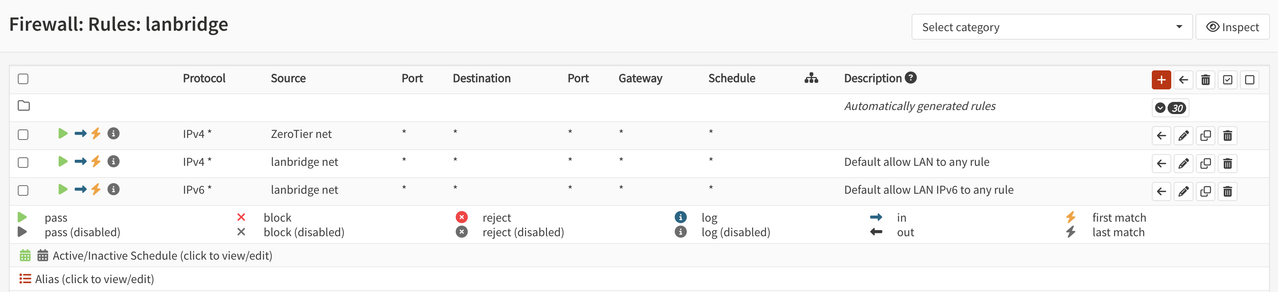
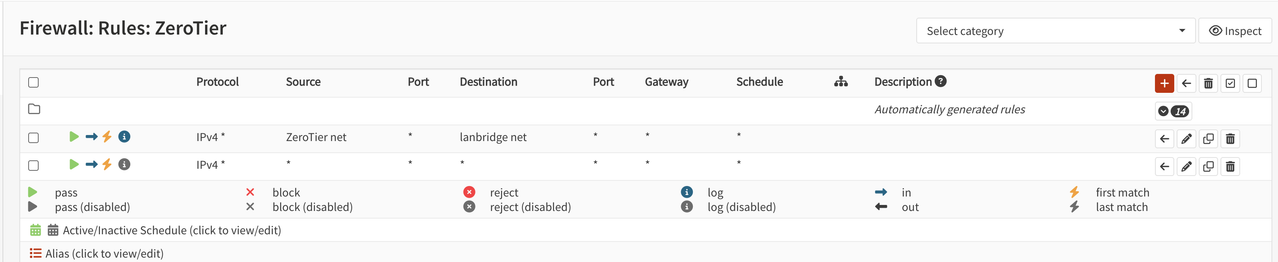
For some reason I can access only OPNsense router via ZeroTier overlay but not the LAN network behind the bridge.
I have a computer with 4 GE ports. The first is WAN and the rest 3 are bridged in to Bridge LAN

Firewall from ZeroTier interface to bridge lan is open


and


Any ideas what is going wrong here?
#4
General Discussion / Port forward and ZeroTier VPN
October 06, 2024, 10:17:16 PM
Guys, need your advice.
I have a home lab with OPNsense running at 10.10.10.216/24 I configured ssh port forward on OPNsense and it works fine if I connect from LAN 10.10.10.0/24. If I come to LAN 10.10.10.0/14 from external ZeroTier client port forward on OPNSense WAN interface does not work.
If I first connect via ssh to some node in 10.10.10.0/24 and after that make connection to 10.10.10.216 on port 122 then port forward on OPNsense works without any issue.

What setting I am missing in OPNsense firewall or somewhere else to enable port forward from anywhere?

I attached picture of my home lab environment for better understanding.

Thanks a lot for help.
#5
Just FYI.

I also had an issue with port forwarding.
When I solved ping issue on WAN interface, port forwarding started to work also.

Here is a link to my topic. Hope it will help to you.

https://forum.opnsense.org/index.php?topic=34320.0
#6
General Discussion / Re: WAN ICMP does not work
June 02, 2023, 04:58:45 PM
I found a solution.

I do not understand why this parameter relates but when I enable  "Disable reply-to" in Firewall settings, it started to work


#7
General Discussion / Re: WAN ICMP does not work
June 02, 2023, 04:50:34 PM
Quote from: franco on June 02, 2023, 02:33:34 PM
I'm pretty sure this is about Firewall: Settings: Advanced: "Disable force gateway" option. Please turn it on and try again.

Franco, unfortunately it did not help.

I opened my Firewall for all ICPM traffic from all to all IP addresses and explicitly setup IPv4GW to use and still no Ping from outside
#8
General Discussion / WAN ICMP does not work
June 02, 2023, 11:35:10 AM
Guys,

Sorry for a stupid question, I need help to enable ping on my WAN interface.
Opnsense is running inside Proxmox VM and WAN is 10.10.10.4.

I created Firewall rule to enable ICMP on wan interface in in direction.
Default Gateway 10.10.10.1 is online.

Anyway ping from WAN subnet 10.10.10.0/24 to 10.10.10.4 does not work
Ping from LAN to 10.10.10.0/24 works without any issues.

I believe something small is missing in my config.

What can it be?  ::)