Menu

Show posts

This section allows you to view all posts made by this member. Note that you can only see posts made in areas you currently have access to.

Show posts Menu

Messages - faunsen

#91
Hi Joe,

ich würde die Aufteilung des Demolab mittels VLANs machen. Dafür sind VLANs ja da.
Wenn Du alles nur mischst bekommen alle den kompletten Netzwerkverkehr mit. Also auch Broadcasts etc.
Dabei stellt sich mir die Frage ob Benutzer aus dem einen Netzwerk Daten aus dem anderen Netzwerk sehen dürfen.
Wenn ja, warum dann die Unterteilung. Wenn nein, wirst du VLANs benötigen.
Das würde auch die Integration des 172.23.0.0/16 Netzes erleichtern.
Komplex ist beides sowieso.
Um Alternativen zu suchen müsste man die Bedingungen kennen.

Semiproduktiv gibt es aus meiner Erfahrung nicht. Wenn Kollegen arbeiten müssen ist das immer produktiv.
Stell dir vor was passiert wenn bei der Menge an Subnetzen das Demolab ausfällt.
Ich würde deshalb noch eine Link Aggregation lagg(4) unter die CARP Schnittstellen legen. Je nach Switch Konfiguarion Active/Passive oder Active/Active.

Bei deinen Problemen kann ich ohne nähere Kenntnis der Netzwerktopologie bzw. Switch Konfiguration nicht weiterhelfen.


Viele Grüße
Frank

#92
Tutorials and FAQs / FTP Proxy Howto
November 02, 2016, 05:25:02 PM
Allow FTP Traffic
This how-to describes the steps to allow FTP traffic from your local network to the internet and from the internet to a FTP server protected by your OPNsense firewall.


Prerequisites
To allow FTP traffic we have to redirect all FTP connections to a local FTP proxy server which dynamically inserts and removes firewall rules according to the FTP port commands.
Additionally we need rules to allow traffic on the local interface to this proxy.

For the setup of the proxy we use the "Ftp Proxy" plugin. It was released with OPNsense 16.7.8.


Forward FTP Proxy
The forward proxy enables internal clients to connect to FTP servers on the internet.


To add a new FTP proxy server navigate to Services->FTP Proxy and click on the Add Button bottom right.
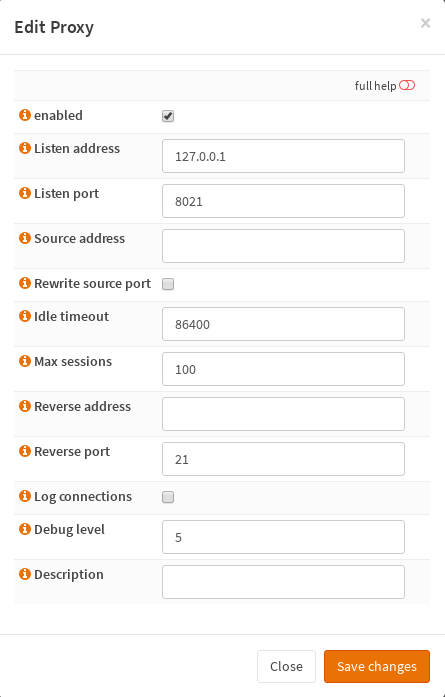
Now you see a dialog with the proxy settings.


For now you can leave the defaults.

NOTE: If the outbound NAT address is different than the primary interface address you need to specify the NAT address as "Source Address".
      This is probably the case in clustered setups with CARP.

Clicking on Save changes creates a new FTP proxy server and starts it. Be patient, this takes a few seconds.
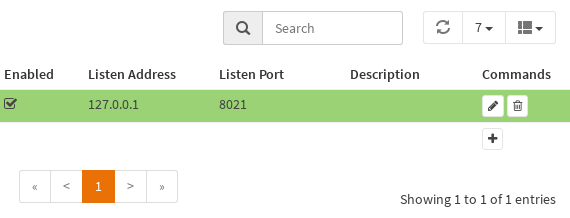
Now this proxy listens on 127.0.0.1 on port 8021 and you should see it as a new entry in the proxy server list.


The green background indicates that the proxy is running. If the background appears yellow it is disabled and stopped.


Next we create rules to allow and redirect FTP from LAN interface to the proxy.
Go to Firewall->NAT->Port Forward and click on the Add Button.
Here we change following options:
   Interface: LAN
   Destination: any
   Destination port range: FTP
   Redirect target IP: 127.0.0.1
   Redirect target port: (other) 8021

This will create a redirect rule for all FTP connections to the internet


and a rule to allow FTP connections to the proxy. (See Firewall->Rules->LAN)


Apply these changes and you can connect FTP server on the internet.


Reverse FTP Proxy
The reverse proxy enables access from internet to a local FTP server behind the firewall.
Clients connecting the firewall via FTP will be redirected to a local FTP proxy and then to the internal FTP server.


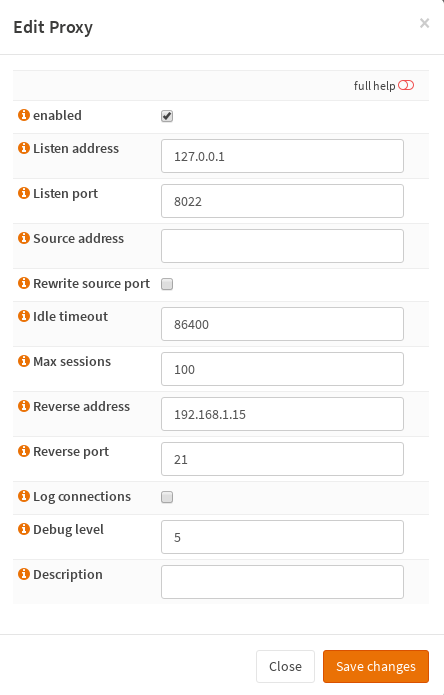
So let's create a new FTP proxy and configure the "Reverse address" to point to the internal FTP server at 192.168.1.15.


Here we need the rules to redirect the traffic from the WAN Interface to the proxy as well.
Go to Firewall->NAT->Port Forward and add a new rule:
   Interface: WAN
   Destination: WAN address
   Destination port range: FTP
   Redirect target IP: 127.0.0.1
   Redirect target port: (other) 8022

And additionally to the auto generated rules we allow FTP access to the WAN interface.


Apply the changes and the FTP server is accessible from the internet.

#93
16.7 Legacy Series / Re: FTP Proxy
September 26, 2016, 10:51:11 AM
No, jftpgw is not needed. It was an early idea to merge ftp-proxy and jftpgw into one plugin.

The pull request is made. I hope I did it right. I'm very new to GitHub.

Thank you for the filter.inc flowers and for the Monit package  :)


Regards
Frank


#94
16.7 Legacy Series / Re: FTP Proxy
September 23, 2016, 04:28:04 PM
Arrrgh! Seems that I've overseen a dependency to jftpgw in the Makefile.
Here is a new one.
Sorry.
#95
16.7 Legacy Series / Re: FTP Proxy
September 23, 2016, 10:36:28 AM
Hi Franco,

great to hear from you. Was quite lost with my monologue  ;)

Quote from: franco on September 22, 2016, 06:16:32 PM
HA synchronisation isn't pluggable, but we can change that as we have for all types of subsystems that plugins require. We just need the use case to model the plugin-code around.
The use case is to have the proxy configuration at the backup node and start/stop it as we start/stop it on the master node.
The plugin should set, lets say, a "hasync" attribute to the config option that has to be synchronized and the core system handles the synchronization.
Same with remote actions. E.g. a ConfigdActionsField could have the "hasync" attribute and will be executed on the backup node whenever an action on the master was executed.

Quote from: franco on September 22, 2016, 06:16:32 PM
Do you still require the pf anchor?
Yes, the ftp-proxy depends on it. Please, please add it to the core system.
The plugin contains a patch for /usr/local/etc/inc/filter.inc in the +POST_INSTALL and +POST_DEINSTALL scripts.
This is not optimal.

Quote from: franco on September 22, 2016, 06:16:32 PM
Does the plugin have any ports dependencies not currently in OPNsense?
No.
But since I know how easy it is to write a plugin I plan to write another plugin for Monit https://mmonit.com/monit/.
There are many services on the firewall simply unmonitored. The admin never gets informed if a service goes crazy.
This plugin would need the sysutils/monit package.

Quote from: franco on September 22, 2016, 06:16:32 PM
If you want we can pull this into the plugins as a development version?
Yes, that would be nice. The attachment contains the package.

The usage is quite easy.
This is what you would do for a simple setup allowing FTP from LAN to the internet.

  • Navigate to "Services -> FTP Proxy Server" and add a ftp-proxy process.
    You can leave the defaults for this setup. The help text is from the ftp-proxy man page.
    The proxy starts automatically if it is enabled and the background color of the row is green.
    If you disable the proxy the process stops and the color changes to yellow.
    To start the proxies on boot the plugin creates a /etc/rc.conf.d/ftpproxy file with the corresponding settings.
  • Next add a "Firewall -> NAT -> Port Forward" rule to redirect traffic from LAN to any on port 21 to localhost port 8021.
    Leave the "Filter rule association" untouched to have a automatic "pass" rule.
That's it.


Kind regards
Frank
#96
16.7 Legacy Series / Re: FTP Proxy
September 22, 2016, 11:50:07 AM
Hello,

I've written a ftpproxy plugin that manages ftp-proxy processes.
It enables ftp through the firewall and access to ftp servers behind the firewall (reverse mode).
The ftp transfer is completely transparent.

Everything works fine but I miss the hook to synchronize the config in a cluster.
Is it possible to sync a specific config section and do some remote configd actions from a plugin?


Kind regards
Frank
#97
16.7 Legacy Series / Re: FTP Proxy
September 19, 2016, 04:32:02 PM
The UI could look like the attached images.

What do you think?
#98
16.7 Legacy Series / Re: FTP Proxy
September 19, 2016, 10:35:34 AM
To answer your questions on github:

  • Can / should it be a plugin?
    I think no, because it's not possible to add the needed anchors dynamically. They are hard coded in filter.inc.
  • Should we enable this per interface?
    Also no, because ftp-proxy binds to an IP address not to an interface. And this is more flexible. Imagine you want ftp traffic to a server with an origin address other than to a second server but over the same interface.
    To avoid security risks the firewall admin must add appropriate access and redirect rules.

  • Should it have its own service page?
    Yes. Define as much ftp proxies here as you need.

  • What configuration parameters do we need?
    Basically the parameters from ftp-proxy.
    mandatory parameters:

    • the source address for the control connection (-a 1.2.3.4)
    • the port where the proxy will listen for redirected connections (-p 8021)
    optional parameters:

    • an option to rewrite the source port to 20 in active mode (-r)
    • debug level (-D 5)
    • set the log flag on pf rules (-v)
    • fixed server address for reverse mode (-R 192.168.1.21)
    • idle timeout for the control connection (-t 86400)
    • queued connections (-q queue)

If no one else writes it, I would.
But the 'ftp-proxy/*' anchors are mandatory. Peanuts for the core team  ;)

For the nontransparent proxy ftp/jftpgw could be useful.
#99
16.7 Legacy Series / Re: FTP Proxy
July 06, 2016, 11:41:06 AM
Quote from: franco on July 06, 2016, 10:19:45 AM
The questions posed are important to avoid security risks: would a separate service page be viable with a bit of configuring, mostly which interfaces are allowed to use the proxy? It would give the FTP proxy a more visible feeling, but I'm not entirely sure it's necessary.

What do you think?

No, I think a transparent FTP proxy should be entirely transparent.
See my comment on GitHub.

For a non-transparent proxy I would stay with squid.
#100
16.7 Legacy Series / Re: FTP Proxy
July 05, 2016, 02:09:58 PM
Quote from: franco on July 05, 2016, 12:42:13 PM
I'll write make this a priority after 16.7 is officially out. How does that sound?
GREAT!!

Quote from: franco on July 05, 2016, 12:42:13 PM
Help in getting that done sooner is always appreciated of course. :)
Of course  8)
Tell me how.
Design, programming, testing, documentation... ?
#101
16.7 Legacy Series / Re: FTP Proxy
July 05, 2016, 11:50:50 AM
Hi franco,

thank you for the response.

It seems that Squid isn't able to act as a transparent FTP proxy. The data connection always fails.

But I've got it with ftp-proxy.
My setup has now 3 interfaces WAN, LAN and OPT1
The goal is to have transparent FTP from LAN to any via WAN and to OPT1 net via OPT1.

I've added the required "ftp-proxy/*" anchors to /usr/local/etc/inc/filter.inc

Now I've started the ftp-proxy for WAN with listen port 8021 and server address of the WAN interface
ftp-proxy -D 6 -d -a <public WAN IP> -r -p 8021

and the ftp-proxy for OPT1 on port 8022
ftp-proxy -D 6 -d -a <private OPT1 IP> -r -p 8022

Next the NAT redirection from LAN net to OPT1net port 21 to 127.0.0.1 8022 and
from LAN net to !OPT1net port 21 to 127.0.0.1 8021

and the pass rules from LAN net to 127.0.0.1 8021 and 8022 respectively.

Works with active and passive FTP  :)


And now the question.
What is the correct way to make this in OPNsense?
I guess hacking filter.inc etc. is not a good idea.

I remember old pfSense versions had an option "Start FTP Helper" for each interface.
Is it possible to implement such option?


Many thanks
Frank
#102
16.7 Legacy Series / FTP Proxy
July 04, 2016, 06:17:56 PM
Hi,

I have a simple OPNsense firewall setup with a WAN and a LAN interface and want to make a FTP connection.
As far as I understood I have to use the FTP proxy  for that.

The proxy config is:
General Proxy Settings
  Enable proxy: checked

FTP proxy settings
  FTP proxy interfaces: lan
  FTP proxy port: 2121
  Enable Transparent Mode: checked

Accessing port 21 from LAN is allowed per rule and I can make a control but no data connection.
Squid is listening on 127.0.0.1:2121.

Do I need additional rules, anchors, redirects etc.?


Kind regards
Frank