

Menu

Show posts

This section allows you to view all posts made by this member. Note that you can only see posts made in areas you currently have access to.

Show posts Menu

Messages - alexroz

#31
I have mini-pc https://www.aliexpress.com/item/4000859041000.html  based on Celeron 3865U with 4GB RAM.
And I am experiencing sharp download bandwidth drop when I turn IPS on. I get download throughput just below 1GBps when Suricata is OFF and between 300 to 400 when Suricata is ON.
Any performance tuning suggestions?
#32
Quote from: mihak on October 05, 2020, 05:52:54 AM
I am running OPNSense on a dedicated i7 CPU with 32 GB of memory and 6 gbps ports. Ubench CPU 1132791 and Ubench MEM 2337171. My internet connection is 1 gpbs.

Before installing and enabling Sensei, average throughput on fast.com or speedtest.com was close to 1.0 gbps with a usual overhead penalty. But when Sensei is installed and active on LAN ports (L3 mode with either native or generic nmap driver), throughput drops to 250 mbps - mere 25% of available bandwidth. CPU is idling and never goes above 15%.

I installed the new 20.7.3-netmap driver - but that didn't change the throughput at all.

What am I doing wrong? What troubleshooting data would you like to see?

Have anyone tried to apply the following hardware performance optimization technique with opnsense?
https://teklager.se/en/knowledge-base/opnsense-performance-optimization/  ?
#33
Do I get it right - according to https://docs.opnsense.org/vendor/sunnyvalley/sensei_hardwarerequirements.html#cpu-memory Sensei cant provide bandwidth above 500 Mbps?
#34
Zenarmor (Sensei) / Re: Eastpect only single core?
December 16, 2020, 07:08:32 PM
posted by mistake
#35
How to get list of all devices using OPNsense as a gateway?
#36
OK I fill like I finally got it.
According to pfSense related sources:

  • LAN address: LAN interface IP address of corresponding firewall interface (e.g 192.168.1.1)
  • LAN net: LAN network and other static routes configured on that interface (range of all available addresses for e.g 192.168.1.0/24)
These make your life easier because, if an address/network changes, you won't have to alter the rule as the rule will be automatically updated to match the new address(es).
Sources:
#37
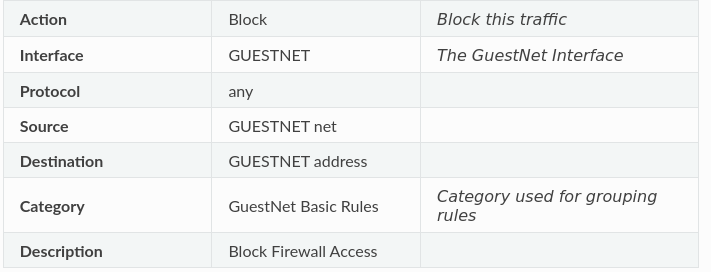
Can you explain how does this rule work?
Pay attention to the destination....

(Source: https://docs.opnsense.org/manual/how-tos/guestnet.html#block-local-networks )
#38
Quote from: marjohn56 on August 26, 2020, 05:10:21 AM
LANx address - a single address e.g. 192.168.1.1 on your LAN
Thank you marjohn56
But I still doesn't get the LANx address part...
LANx address isn't any particular IP address. Right?
If it is a set of all available addresses on a given net - how does it differ from LANx net, as long as a net includes all its addresses?
I understend that a net & a address can't be the same even based on following example https://docs.opnsense.org/manual/how-tos/guestnet.html#block-local-networks
But how do they differ?
#39
There are some network options available as a source or a destination while creating firewall rules:
Networks

  • any
  • This Firewall
  • LANx address
  • LANx net
  • Loopback net
Thous terms may sound obvious for some people, but I am struggling to grasp their true meaning.
For example LANx address and LANx net networks sounds the same for me.
Can anyone point me to some documentation clearly explaining these options?
#40
Just found a "right" solution in the official documentation: https://docs.opnsense.org/manual/how-tos/guestnet.html
#41
  ;) As they say RTFM
Just found it in the official documentation https://docs.opnsense.org/manual/how-tos/guestnet.html#allow-dns
#42
Quote from: Maurice on May 09, 2020, 04:49:44 PM
(Some services are always shared between LANs, e. g. Unbound DNS. If you want to completely isolate the networks in any aspect, two OPNsense instances might be a better choice.)
Can you elaborate some more about DNS service sharing between WAN and LAN interfaces?
I can't figure out how to do it...
When I apply this https://www.reddit.com/r/OPNsenseFirewall/comments/bm4b6w/outgoing_firewallrules/emweuyc?utm_source=share&utm_medium=web2x&context=3 solution my isolated LANs have no access to system DNS...
#43
General Discussion / Ways to isolate LAN interfaces...
August 23, 2020, 09:30:24 PM
I am a complete newbie at Opnsense. It is my first post here.
I have a WAN and management LAN interface.

I need to create several additional LAN (opt1, opt2, optN) interfaces isolated from all others except for a WAN. In other words, I need several LAN interfaces that have internet access but can't access each other.
So far I came across the following solution: https://www.reddit.com/r/OPNsenseFirewall/comments/bm4b6w/outgoing_firewallrules/emweuyc?utm_source=share&utm_medium=web2x&context=3

Is it there any other good solutions for such a "challenge"?

