

Menu

Show posts

This section allows you to view all posts made by this member. Note that you can only see posts made in areas you currently have access to.

Show posts Menu

Topics - Porfavor

#1
Hello,

I just setup a wireguard site-to-site connection which in general now seems to work fine. So there is a way opnsense at site A has internet access and LAN devices can also reach the other site B through the tunnel.

Unfortunately, the LAN devices at site A, which shall access the internet through opnsense at site A, seem to have no internet access besides of that. I cannot reach the web and cannot ping e.g. external IPs like 8.8.8.8. Do it's obviously not only a DNS issue. Computers at site A have OPNsense site A as default gateway.

Maybe I have mistaken or forgotten something about an interface or firewall rules (although I followed the guide). LAN interface das the default allow any rule.
Or could it be something about (outbound) NAT? I'm not familiar with this and how traffic is being passed between interfaces (I thought, the LAN firewall rule was enough).

Any help on where to start troubleshoothing appreciated.
#2
Hello,

I am trying to set up a site to site VPN connection via Wireguard.

Site A is a remote VLAN, where OPNsense has been installed to a VM.
Site B is my home network. There is a router (fritzbox) and behind the router there is a server, wheren OPNsense is installed.

I followed the config and searched many forums but couldn't solve me issues, so far.
I can establish a connection and a handshake is made. But I cannot access the LANs on the other site.

I have set the allowed IPs as decribed and all the firewall rules on both sites. Also have I setup a route on the home router pointing to te remote LAN, of course. Firewall shows me that traffic comes to the other end of the tunnel to the other OPNsense but it seems as if OPNsense would not know what to do with it, in both directions.

I am clueless.

By the way: OpenVPN between does two sites works fine. So this should really be something wireguard specific or something I missed at the home router.

#3
Hello,

I have setup two VPN servers on my opnsense (at a remote location). One is a peer-to-peer VPN where the remote network is my home LAN. This works well.

Moreover, I setup a second server for remote access. It is possible to connect to this server and reach the actual local LAN. Though, I cannot reach the home LAN through it. I entered this network into Local IPv4 network within the server settings.

What else do I have to do? Or isn't this possible?
#4
German - Deutsch / Peformance-Probleme mit OPNsense
November 13, 2022, 11:03:19 PM
Guten Abend,

Ich habe eine VPN Site-to-Site-Verbindung zwischen meinem heimischen Netzwerk und einem gehosteten VLAN (250 Mbit/s). An beiden Enden fungiert jeweils eine OPNsense VM and Endpunkt. Das funktioniert grundsätzlich auch prima. Nur lässt die Geschwindigkeit stark zu wünschen übrig. Wenn ich Dateien kopiere, bekomme ich idR weniger als 3-5 MB/s, also ca. 15-25 Mbit/s, wobei dies stark schwankt und kurzzeitig auch bis ca. 1 MB/s runtergeht. Auch ein Download auf einen Server beim Hoster hinter der OPNsense beim Hoster ist entsprechend langsam. Es scheint also so, dass alles, was über die OPNsense läuft, zu Einbrüchen führt. Innerhalb des VLAN ist die Geschwindigkeit erwartungsgemäß.

Bitte nicht auf den Werten festnageln, letztlich sind Sie auf jeden Fall zu niedrig bei einer Download-Messung (iperf3 -R).

Die gehosteten Server sind grundsätzlich nicht öffentlich erreichbar, alles läuft also - abgesehen vom VLAN - über die OPNsense.

Mit iperf3 wurden diverse Messungen vorgenommen.


Zuhause habe ich 1 Gbit/s DL und 50 Mbit/s UL. Wenn ich nun eine Datei von Netcup nach Hause kopiere, wäre das nach meinem Verständnis ein Download. Die niedrigste Rate wäre dann das VLAN mit 250 Mbit/s. Das kann dann wohl kaum ein gewöhnliches Verhalten sein. In die andere Richtung ist die Geschwindigkeit aber ähnlich. Sie ist insgesamt recht wenig konstant .


Ich habe schon ein paar Dinge ohne Erfolg probiert und möchte eigentlich nicht weiter im Dunkeln herumtappen.


Was ich ausschließen kann, ist jedenfalls die CPU auf beiden Seiten. Die ist maximal bei 25-40 %, eher weniger.


Was ich zumindest versucht habe:


- hw.ibrs_disable under System->Settings-> Optimierungen auf "1"
- Schnittstellen->Einstellungen: CRC, TSO and LRO deaktiviert
- MTU auf 1400 oder 1300 auf Wireguard-Schnittstelle


Ich habe gelesen, dass man das Parent-Interface in der OPNsense aktivieren soll. Was genau das bedeuten soll, ist mir aber nicht klar.

Ich weiß nicht, wo ich ansetzen könnte, und bin daher über jede Hilfe dankbar.
#5
Good evening,

I posted this topic at https://forum.opnsense.org/index.php?topic=28451.0, as well. As I am not sure, if or how soon I am going to receive an answer to my question there, I also post it here. I hope, this is allowed.

I setup Wireguard on opnsense, site to site.
So far, I can reach the local IP of opnsense at site b from site A. Unfortunately, I am not able to reach othere IPs at site B. From a device at site B I can't even reach the local opnsense IP at site A.

Site B is a VLAN, which means there is no router as standard gateway, where I could set some routes. Thinking logically, I suppose that I would need to set routes at the other devices at site B so they know which device to ask how to reach site A (have to ask opnsense at site B)

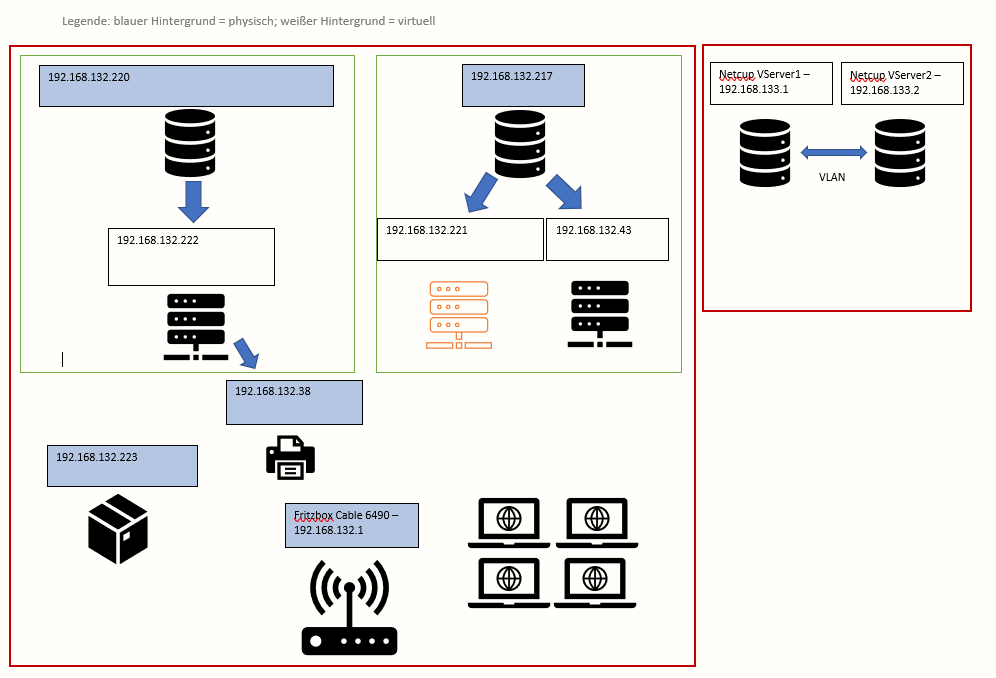
On the image attached there is the opnsense VM at site A missing (IP: 192.168.132.32). Opnsense at site B is on 192.168.133.1. There is windows running on 192.168.132.2.

Site A (home) is the red square on the left, site B is the red square on the right. At site A there is a VM with opnsense running (behind a router - Fritzbox), site B also has a VM but no router, instead a hoster's VLAN, to two NICs.


Allowed IPs at site A: 10.210.0.0/24 (after a hint on another board changed to /32) as well as 192.168.133.0/24
Allowed IPs at site B: 10.210.0.0/24 (after a hint on another board changed to /32) as well as 192.168.132.0/24
The Wireguard IPs at the two endpoints are 10.210.0.1 (site A) and 10.210.0.2 (site B)

Firewall site A:

- WAN rule with Wireguard Port, incoming, UDP, Gateway: standard
- Wireguard (Group): Source single host or network 10.210.0.0/32 as well as 192.168.133.0/24


Firewall site B:

the same, but IP range at second rule (Wireguard): 192.168.132.0/24
No other restrictions set via rules.

Blocking private networks in WAN interface at site A is deactivated.


What could be the issue?

#6
Guten Abend,

ich habe Wireguard auf opnsense, Site to Site, eingerichtet.
Ich kann nun auch von Standort A die lokale IP der opnsense an Standort B erreichen. Andere IPs im Netz B erreiche ich hingegen nicht. Von einem Gerät an Standort B aus erreiche ich an Standort A nicht einmal die lokale IP der opnsense.

Standort B ist ein VLAN, d.h. ich habe keinen Router als Standartgateway, wo ich Routen setzen könnte. Die Logik sagt mir aber, dass ich auf den weiteren Geräten an Standort B Routen setzen müsste, damit diese wissen, wen sie überhaupt fragen müssen, wenn sie das Subnetz von Standort A erreichen wollen (nämlich die opnsense an Standort B).

In dem anhängenden Schaubild fehlt noch die opnsense VM an Standort A (IP: 192.168.132.32). Die opnsense an Standort B befindet sich auf 192.168.133.1. Das Gerät 192.168.132.2 ist ein Windows-System.

Standort A (zuhause) ist das rote Quadrat links, Standort B das rote Quadrat rechts. An Standort A gibt es eine VM mit opnsense (hinter einer Fritzbox), an Standort B ebenfalls (da ist es aber in einem VLAN bei Netcup).

Allowed IPs an Standort A: 10.210.0.0/24 (Nach Hinweis in anderem Forum geändert auf /32) sowie 192.168.133.0/24
Allowed IPs an Standort B: 10.210.0.0/24 (Nach Hinweis in anderem Forum geändert auf /32) sowie 192.168.132.0/24
Die Wireguard IPs der beiden Endpunkte sind 10.210.0.1 (Standort A) und 10.210.0.2 (Standort B)

Firewall Standort A:

- WAN Regel mit Wireguard Port, eingehend, UDP, Gateway: standard
- Wireguard (Group): Quelle Einzelner Host oder Netzwerk 10.210.0.0/24 sowie 192.168.133.0/24


Firewall Standort B:

dasselbe, nur die zweite IP-Range bei der zweiten Regel: 192.168.132.0/24
Ansonsten keine Einschränkungen bei den Regeln.


Blockierung privater Netze in WAN Schnittstelle Standort A ist deaktiviert.


Wo kann das Problem liegen?

