Menu

Show posts

This section allows you to view all posts made by this member. Note that you can only see posts made in areas you currently have access to.

Show posts Menu

Messages - Vectralis

#1
Quote from: nero355 on July 16, 2026, 02:22:36 PMhttps://blog.nullbyte.be/en/posts/proximus-on-your-terms-running-internet-and-tv-with-your-own-gear
i read this, this guide is outdated unfortunately, and it uses a fiber connection. i use a vdsl connection because fiber isn't available yet unfortunately.

Quote from: nero355 on July 16, 2026, 02:22:36 PMAnd there is probably someone who got it working @ https://gathering.tweakers.net too :)
i created the following thread on tweakers:
https://gathering.tweakers.net/forum/list_messages/2340758

i also created following thread on userbase:
https://userbase.be/forum/viewtopic.php?t=68432
#2
Wait, I found this on the Proximus website:

https://coral-rowena-16.tiiny.site

Is someone able to tell me how I exactly set it up on my opnsense using igmp Proxy and firewall?

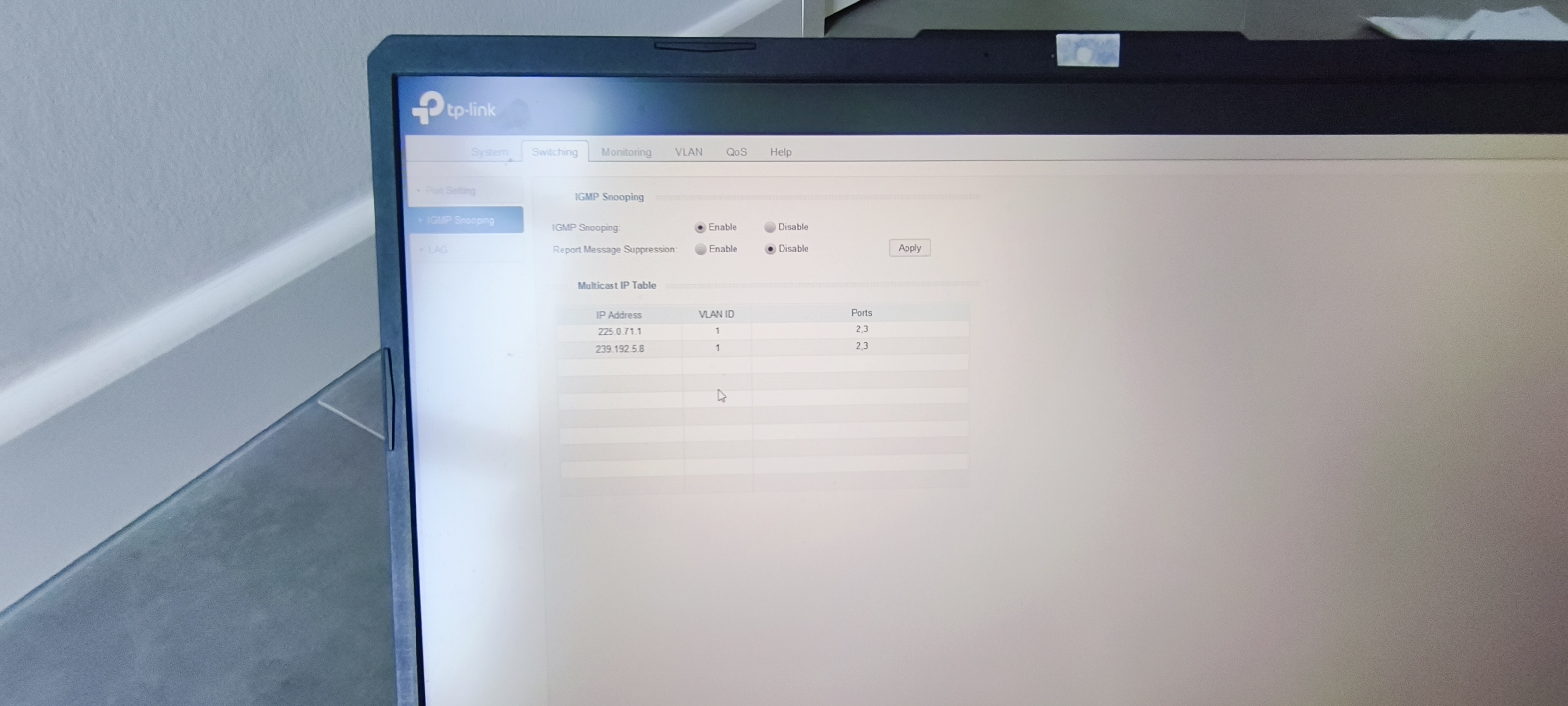
The igmpv3 snooping on the switch is working perfectly btw. But now I want to ditch the ISP router and replace it with my opnsense router.
#3
Quote from: nero355 on July 15, 2026, 03:04:10 PM
Quote from: Vectralis on July 15, 2026, 10:58:29 AMIs this the right configuration for my TL-SG105E switch?
I would say it is, but then again I have no experience with those things when it comes to IGMPv3 Multicast Snooping and there is always a chance a firmware upgrade might improve/fix the feature for whatever reason...

Try looking around on the Internet for information about your ISP's IPTV Service and compare those setups to yours is IMHO the best thing you can do :)

That sounds like a good plan. But the issue is that 95% of people here aren't that technical and never even considered to use any other equipment than the ISP provides.
#4


It seems to work smoothly, but it still stutters like once per 2 minutes (it's not a lot, but it's more than when it's connected directly to the ISP router). If I connect the tv box directly to the fritzbox it also doesn't stutter.
#5


Is this the right configuration for my TL-SG105E switch? I am first going to test how it's working when I plug the TV box into this switch and connect the switch directly to my ISP router. If that doesn't work, we know the issue is still on the switch.
#6
Ok, I will back at this thread in some weeks/months
#7
Thanks, another question, how long do threads on this website stay open? Is it for example possible to like test this after a month orso and then still answer on this thread? Or do threads get closed after a certain amount of time inactivity?
#8
I was struggling the whole day with the vlans. So I ended up just deleting all vlans, and placed an Intel x550 T2 in my opnsense pc. Now I moved the pc to the same room where the modem (fritzbox) is located. Lan and wan are physically separated now. My whole network is already working. So that's cool. The only thing I am struggling with now is the Proximus tv and igmp Proxy. Even without the igmp Proxy plugin on opnsense the Proximus tv was just working fine while connected to opnsense lan, but the live tv and etc stutters sometimes and sometimes the view is blurry. But it's receiving something at least. Then I did some things with igmp Proxy plugin and firewall thingies, but it didn't make any difference, it didn't get worse, but it also didn't get better. Does anyone know how I can fix this so the Proximus tv is working perfectly behind my opnsense? I am 100% sure that the issue is on opnsense since Proximus tv behind fritzbox 7530 is just working perfectly as it should.
#9
Development and Code Review / Re: vibecoded plugin
July 10, 2026, 12:44:31 AM
Quote from: Vectralis on July 08, 2026, 05:34:28 PMthat's exactly what i mean. sshd (hardware). i planned to use an hdd just for backups, but i didn't have a spare hdd laying around. that's why i ended up using an sshd for backups. i simply found that in my drawer lol.

Is it possible to do it with the sshd?
#10
Hi everyone,

I am a complete beginner with OPNsense and networking in general. I want to build a "Router-on-a-stick" setup using a single-NIC PC with OPNsense 26.1, but I need some guidance on the exact step-by-step configuration.

My Goal & Hardware:
- ISP: Proximus VDSL (Belgium)
- Fritz!Box 7530 (currently acting as router/modem, want to use it purely as modem).
- OPNsense PC: Has only 1 physical NIC.

Switches:
- TL-SG105E (located in the Modem Room)
- TL-SG108E (located in the Router Room)

Target Network Settings:
- OPNsense LAN IP: 192.168.129.1/24
- Fritz!Box IP (for web management): 192.168.129.2/24

DHCP Range:
192.168.129.50 – 192.168.129.254

DNS: 1.1.1.1

Physical Connection Plan:

- Inter-switch link: Cable from TL-SG105E Port 1 to TL-SG108E Port 1.

- Modem Room (TL-SG105E):
Port 2 connected to Fritz!Box LAN 1 (for Internet traffic).
Port 3 connected to Fritz!Box LAN 2 (to access Fritz!Box web GUI at 192.168.129.2).
Ports 4–5 for local clients.

- Router Room (TL-SG108E):
Port 2 connected to the OPNsense single NIC.
Ports 3–8 for local clients / APs.

My Questions:

- VLAN Tagging / Switch Setup:
How should I precisely configure the 802.1Q Tagged/Untagged ports and PVIDs on both TP-Link switches for VLAN 1 (LAN) and VLAN 10 (WAN)?

- OPNsense 26.1 Setup:
Since I am using a single physical NIC:
What exact steps do I need to take in OPNsense to set up the VLAN 10 interface for WAN while keeping the physical NIC for LAN (192.168.129.1)?
How should I configure LAN / WAN settings?

- Fritz!Box Configuration:
Is connecting two cables from the Fritz!Box to the SG105E (one for WAN on VLAN 10, one for LAN management on VLAN 1) the correct way to keep access to 192.168.129.2?

Could someone walk me through the correct sequence of steps so I don't lock myself out during setup?

Thanks a lot for helping out a beginner!

And sorry if I ask dumb questions lol
#11
Development and Code Review / Re: vibecoded plugin
July 08, 2026, 05:34:28 PM
that's exactly what i mean. sshd (hardware). i planned to use an hdd just for backups, but i didn't have a spare hdd laying around. that's why i ended up using an sshd for backups. i simply found that in my drawer lol.
#12
Development and Code Review / Re: vibecoded plugin
July 08, 2026, 01:33:37 PM
it's not a typo. in the machine i have an ssd and an sshd. i want to use the ssd for booting and stuff like that. and the sshd just like some folder or something with the backups.
#13
Development and Code Review / Re: vibecoded plugin
July 08, 2026, 11:06:09 AM
and if i for example want to backup to the sshd in the machine using that feature, and opnsense is installed on the ssd. does it still need to be zfs then? or is ufs also alright?
#14
Development and Code Review / Re: vibecoded plugin
July 07, 2026, 08:44:31 PM
Quote from: Patrick M. Hausen on July 07, 2026, 12:22:26 PMBut there is a periodic backup mechanism with various destination options in OPNsense, already. Standard, out of the box.

Really? that would be the thing i was searching for. can you maybe tell me where i can find it on the opnsense webpanel?
if that's already built in, then i don't need my plugin and then the plugin is completely useless.
i was probably just too blind to see it because i was in a hurry lol
#15
Development and Code Review / Re: vibecoded plugin
July 07, 2026, 12:14:28 PM
Thanks for taking the time to review my code.
You are right, a 250k file doesn't bother any SSD, so that's not the most important part.
You are right about the fact that the config stays the same for a long period of time, and that it isn't very important to have daily backups. but you never know, i have been a windows user for a long time and found out that backups are very important, but in the case of windows the software itself also isn't that stable. opnsense is indeed probably rock solid and can't break if you don't touch it. but it's just a habbit. if you keep a pc running windows on 24/7 without doing somethings, it can still break itself. the built-in solution you propose to backup my opnsense configuration is a working approach but it's manual work. i like automation and want everything from the router to be kind of centralised on the router. if i manually download it on my client pc. it can still get lost if i save it at a random place and never look back to it.
the readme.md summarizes very good what i want to achieve, but the most important thing i wanted to make sure is that the code was actually working. i litterally installed opnsense yesterday so i don't know a lot about it, so i am not very familiar with testing it on a platform which i have never used.