

Menu

Show posts

This section allows you to view all posts made by this member. Note that you can only see posts made in areas you currently have access to.

Show posts Menu

Messages - Jwidess

#1
Quote from: FraLem on January 30, 2026, 08:13:22 AMLooks great, looking forward to the Smartctl version.

Thanks for sharing

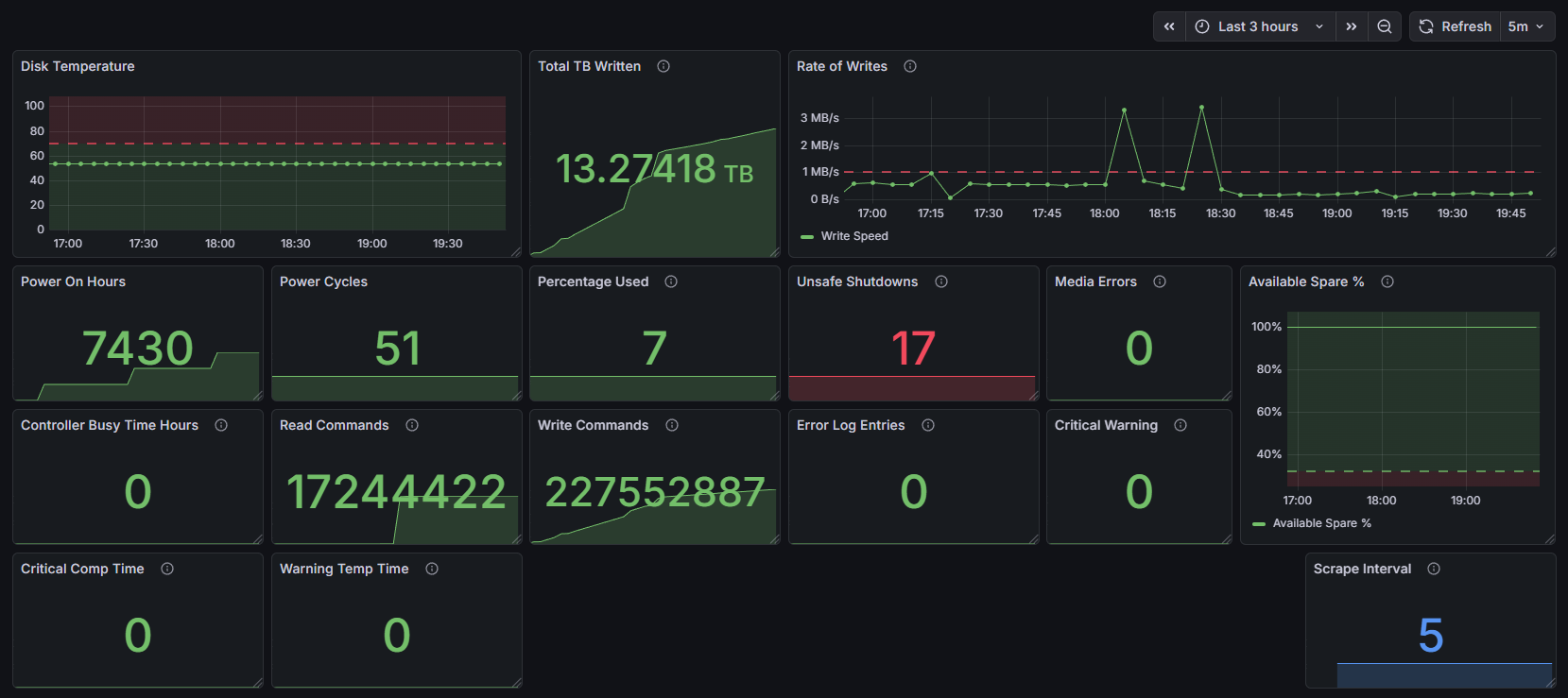
Thanks, FraLem, for the kind words! However, I'm not sure what you mean by "looking forward to the Smartctl version." as the script uses smartctl to collect its metrics. If you meant looking forward to the SATA version, I'd appreciate it if you, or anyone, could provide a few sample outputs of `smartctl -j -a` on a SATA drive so I can make the required changes, thanks! I've added a file for logging these to the repo here: smartctl-outputs.md
#2
Hi all,
I was looking for a way to monitor my router's NVMe drive statistics, but didn't find anything I liked, so I created a little shell script and a configd action to collect SMART data and expose it to Prometheus via the Node Exporter plugin and textfile collector. I also created a nice Grafana dashboard that displays all these metrics, image below. I liked this approach as it meant I just needed two plugins (I already had installed), a small script, and a configd action to schedule it with cron. Currently, the script only supports NVMe drives as it uses the nvme_smart_health_information_log object of Smartctl, but I plan to add SATA drive support down the line. Please let me know if anyone has a better way of monitoring these stats that I didn't find while researching this, thanks!

More info in the repo here: https://github.com/jwidess/OPNsense-node-exporter-smartctl-collect


#3
Looking around a bit, it seems like multiple people have reported that these cheap SP drives report static temperatures. It must be a bad implementation of SMART reporting on their end, as it seems like even the low-end Phison E21T, E27T, etc., controllers have "Built-in internal thermal sensor"
Reddit post: https://www.reddit.com/r/buildapc/comments/1nv0ht6/silicon_power_500gb_ud90_nvme_40_i_this_it_has/
#4
I unfortunately don't have another SP UD90 drive on hand to verify this with. I may have the opportunity to test another one sometime in the next few weeks, but it's unlikely.
#5
Something else I have noticed is that when using "nvmecontrol logpage -p 2 nvme0" the "Temperature:" is always exactly the same. I have never seen anything other than "311 K, 37.85 C, 100.13 F", the same goes for smartctl.
I will see tomorrow if I have a duplicate model drive I can test this on.
#6
Quote from: bsdimp on January 12, 2026, 10:13:55 PMSo async events are problems with the drive, usually temperature. Log page 2 is the SMART page and it should say what it is.

But if it's a constant spew, then maybe we aren't clearing enough bits in the event masks. Turning off logging almost certainly is the wrong approach, since all those interrupts are boggong down the system...

What does logpage 2 say? nvmecontrol logpage -p2 nvme0

Warner

Good point, I suppose just hiding these is not a great solution. My PR was primarily just a solution to give myself the option to suppress them to allow for an install. At the end of the bug report, I have my output from that machine with the drive experiencing the errors:

SP500GBP44UD900 nvmecontrol Output:
~ # nvmecontrol logpage -p 2 nvme0
SMART/Health Information Log
============================
Critical Warning State:        0x00
 Available spare:              0
 Temperature:                  0
 Device reliability:            0
 Read only:                    0
 Volatile memory backup:        0
Temperature:                    311 K, 37.85 C, 100.13 F
Available spare:                100
Available spare threshold:      10
Percentage used:                0
Data units (512,000 byte) read: 7531
Data units written:            10305
Host read commands:            216800
Host write commands:            150867
Controller busy time (minutes): 2596
Power cycles:                  32
Power on hours:                43
Unsafe shutdowns:              9
Media errors:                  0
No. error info log entries:    0
Warning Temp Composite Time:    0
Error Temp Composite Time:      0
Temperature 1 Transition Count: 0
Temperature 2 Transition Count: 0
Total Time For Temperature 1:  0
Total Time For Temperature 2:  0

Bug report: https://bugs.freebsd.org/bugzilla/show_bug.cgi?id=292410
#7
This is stemming from my post here for context: Install problem on NVMe (nvme0: async event occurred)

I currently have some small changes on a branch I made of stable/25.7 just so I could get my changes compiled and installed ASAP. However, now I'd like to PR these changes into either OPNsense src or FreeBSD src, but I'm unsure which repo and branch to PR.
I've checked FreeBSD releng/14.3 and the 3 files I've modified are identical to stable/25.7, so I was thinking of PRing them there, but as it's a release branch, that doesn't seem appropriate... If anyone has some advice on how I should go about this, it would be much appreciated! I have reviewed 25.7/CONTRIBUTING.md, articles/contributing, etc. but have not found a suitable answer.
#8
I decided to investigate these nvme0: async event occurred (type 0x1, info 0x01, page 0x02) messages further to figure out what was causing them and if there was a way to prevent/suppress them. I ended up modifying the FreeBSD kernel, specifically nvme_ctrlr.c under /sys/dev/nvme (alongside a few complementary files), to wrap this logging in a tunable parameter that can be specified in /boot/loader.conf to suppress these messages.
I built the vga iso, burned it to a USB, and started the install. Then I set the new param hw.nvme.log_async_events="0" and installation went perfectly. I've made a fork and branch of opnsense/src with my changes and added a release with the compressed iso attached to it if anyone else is interested. I plan to probably PR this into the FreeBSD src repo as I feel like this is an upstream change that would benefit all of FreeBSD, not just OPNsense. However, if anyone has advice on that, please let me know!

My 25.7.10 async-tunable Release Here: https://github.com/jwidess/src/releases/tag/25.7-async-tunable.1
#9
Just thought I'd share my experience, I am running OPNsense v25.7.10 with ntopng Community v.6.7.260105 rev.27191 (FreeBSD 14.0), and disabling "Active Network Discovery" was all that was needed for the crashes to stop. Since I disabled this, the service has been up and running nonstop for ~3 days now. Before, it wouldn't last longer than 4-12 hours before crashing/stopping with no logs. I'm guessing this will also fix the crashes on the standard (~v6.4?) plugin version as well, but it's at least worth trying to disable this if you're having crashes with it enabled.
#10
Quote from: meyergru on January 07, 2026, 03:34:41 PMIt does not have to be the drive, see https://forum.opnsense.org/index.php?topic=42985.0, point 23.

Well when repeating the install with a WD branded 500GB NVMe drive, these async messages disappeared. Additionally I did follow point 23 from that link and applied the tweaks from here, but that changed nothing unfortunately. And I appreciate the help!
#11
Quote from: meyergru on January 07, 2026, 08:38:45 AMAs it seems, there are now many more no-name NVMEs build into those chinese units, probably because of the price raise in SSD storage.

Under FreeBSD, they can show such effects, because their manufacturers do not care about FreeBSD (and FreeBSD does not care about circumventing NVME protocol problems).

I would change the NVME for a known brand with high TBW.

P.S.: That now made it to https://forum.opnsense.org/index.php?topic=42985, point 14.


Thanks for the reply, however I've had good experiences with Silicon Power in the past and thought they where at least a decent drive brand, however trying to use another SP branded 128GB Model (P34A60 SP128GBP34A60M28) resulted in the mini PC not even posting, so maybe they're a mediocre brand after all.

And yeah @pfry they appear to be real SP drives, don't know who'd bother making clone SP drives lol.

I might go digging around in the kernel to understand how and why these async events are getting generated, but for now we'll get a different brand drive.
#12
Hi all,
I have been struggling the last few hours trying to figure out how to suppress messages I am getting during the install on my Mini PC. During the install, after I boot normally into multi-user mode, the console is spammed with the following lines, nvme0: async event occurred (type 0x1, info 0x01, page 0x02)They are spammed at such a rate I cannot get through the installer as even the end GUI when run with installer and opnsense is overwritten by the console messages.
The only other post I can find referencing a similar issue is here, but @MattD76 reported they were still getting the async messages. Please let me know if anyone has a solution to this problem; it would be much appreciated!
NOTE: I tested this with another model of NVMe drive (WD Blue) and this issue completely disappeared, so if I can't get this resolved, I will return my current drive and get another WD, but I'd prefer not to.

Computer: Generic Mini PC "MOGINSOK Mini PC 2.5Gbe Intel Celeron N5095 Quad Core, 4*Intel I225-V"
Drive with async errors: Silicon Power 500GB UD90 NVMe 4.0 Gen4 PCIe M.2 (SP500GBP44UD900)
Install: OPNsense-25.7-vga-amd64.img.bz2
Video Example: https://youtu.be/SFHt2blRSR0
EDIT: Actually, the 128GB A60 SP Drive (SP128GBP34A60M28) would cause my Mini PC to not even POST; the UD90 drive had the async errors.
EDIT 2: FreeBSD Issue here: https://bugs.freebsd.org/bugzilla/show_bug.cgi?id=292410

