
 "
"
I've did some additional testing, however nothing seems to work. I guess I'll switch my Internet provider to someone that allows access without using their own hardware
This section allows you to view all posts made by this member. Note that you can only see posts made in areas you currently have access to.
Pages1
#1
General Discussion / Re: Adding a VLAN to a transparent filter bridge
January 08, 2026, 10:34:31 AM #2
General Discussion / Re: Adding a VLAN to a transparent filter bridge
January 06, 2026, 08:54:37 PM
my system routes look like this
Routing tables
Internet:
Destination Gateway Flags Netif Expire
default 192.168.1.1 UGS igc0
localhost link#7 UH lo0
192.168.1.0/24 link#1 U igc0
192.168.1.1 link#3 UHS igc2
192.168.1.2 link#7 UHS lo0
OPNsense link#7 UHS lo0
192.168.20.0/24 link#11 U vlan01
192.168.20.1 link#7 UHS lo0
I've also checked the firewall log and the rule seems to work also
__timestamp__ 2026-01-06T20:57:55
action [pass]
anchorname
dir [out]
dst 193.99.144.85
dsthostname
ecn
id 41301
interface igc0
ipflags DF
ipversion 4
label let out anything from firewall host itself
length 84
offset 0
protoname icmp
protonum 1
reason match
rid fae559338f65e11c53669fc3642c93c2
rulenr 58
src 192.168.20.103
Routing tables
Internet:
Destination Gateway Flags Netif Expire
default 192.168.1.1 UGS igc0
localhost link#7 UH lo0
192.168.1.0/24 link#1 U igc0
192.168.1.1 link#3 UHS igc2
192.168.1.2 link#7 UHS lo0
OPNsense link#7 UHS lo0
192.168.20.0/24 link#11 U vlan01
192.168.20.1 link#7 UHS lo0
I've also checked the firewall log and the rule seems to work also
__timestamp__ 2026-01-06T20:57:55
action [pass]
anchorname
dir [out]
dst 193.99.144.85
dsthostname
ecn
id 41301
interface igc0
ipflags DF
ipversion 4
label let out anything from firewall host itself
length 84
offset 0
protoname icmp
protonum 1
reason match
rid fae559338f65e11c53669fc3642c93c2
rulenr 58
src 192.168.20.103
#3
General Discussion / Re: Adding a VLAN to a transparent filter bridge
January 06, 2026, 08:00:55 PM
still doesn't work

are those settings correct?
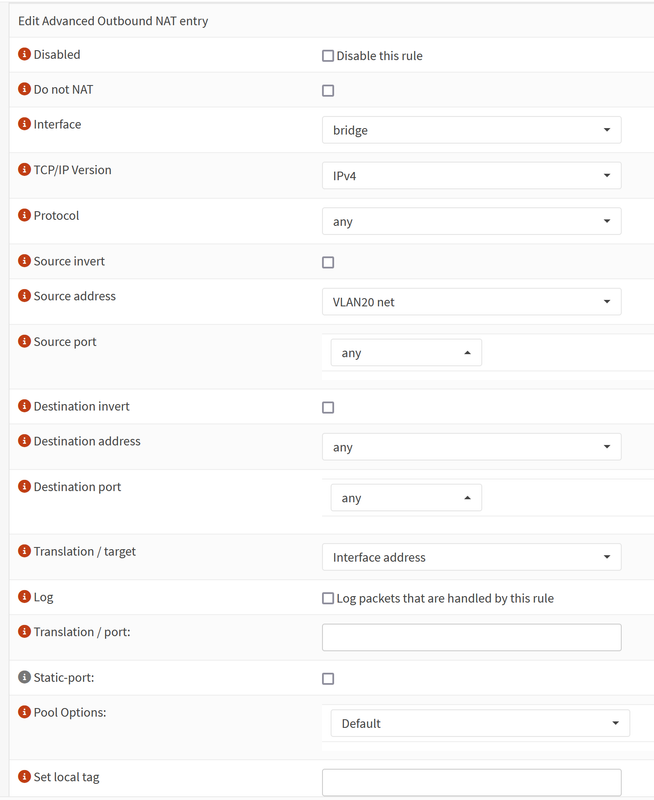
are those settings correct?
#4
General Discussion / Re: Adding a VLAN to a transparent filter bridge
January 06, 2026, 06:26:08 PMQuote from: pfry on January 06, 2026, 04:51:59 PMQuote from: Patrick M. Hausen on January 06, 2026, 04:17:53 PMMHO you should (if you did not already) place an IP address in the 192.168.1.0/24 network on the bridge interface and configure the ISP router as the default gateway.[...]
Isn't there still an issue with the route from the gateway to the igc3 subnet? I'm assuming (but not certain) that the gateway is not user-configurable, which complicates Internet access. (Cedrik's solution is the obvious one, if the gateway is configurable.)
The clients on the bridge would not be accessible from the routed subnet (and vice-versa) due to the lack of a route (as desired; although this would change if one is added to the gateway), and could (should) be filtered in any case.
Interface-based filters on the bridge interfaces would be useful here (allowing port-based differentiation on the bridge), but (apparently) not possible with pf. (I have tested this - pf will not evaluate interface filters on bridge members regardless of net.link.bridge.pfil_* settings; I have not tested the other filter systems.)
what I was able to achieve in the meantime, I've configured the ISP router as upstream gateway and now when I issue a ping/nslookup on an address, the resolution is working fine and the correct IP is shown, however I don't get a ping response.
I wanted to test NAT however I'm not sure how to configure it.
Do i have to use port-forward for all relevant ports? or Outbound, however I've disabled this since I've read that it should be disable when using bridge mode
#5
General Discussion / Re: Adding a VLAN to a transparent filter bridge
January 06, 2026, 04:13:56 PM
this is where I am stuck at the moment. I have added the VLAN and created an interface on it. DHCP works also.
IP of the interface is 192.168.20.1 I can ping this one from a test client within.
After adding an interface to the untagged VLAN (192.168.1.10) I can now ping this address from the VLAN20 testclient, however I can't ping any other client in the untagged network or the ISP router.
I have yet to find a Rule that allows this or is there any other config needed? I've tried an allow all rule in both directions for testing on the IN interface but this did not help.
IP of the interface is 192.168.20.1 I can ping this one from a test client within.
After adding an interface to the untagged VLAN (192.168.1.10) I can now ping this address from the VLAN20 testclient, however I can't ping any other client in the untagged network or the ISP router.
I have yet to find a Rule that allows this or is there any other config needed? I've tried an allow all rule in both directions for testing on the IN interface but this did not help.
#6
General Discussion / Re: Adding a VLAN to a transparent filter bridge
January 06, 2026, 01:59:04 PMQuote from: pfry on January 06, 2026, 11:13:08 AMIf you simply wish to allow for communication between the bridge subnet and igc3 but not with the gateway itself (i.e. no Internet access for devices not on the bridge), you could assign an address to the bridge (directly or via DHCP from your gateway) and use the firewall to route between the bridge and igc3.
I may have overlooked other possibilities (e.g. proxy ARP?). Of course there are solutions outside of OPNsense.
Thanks for your response, I want exactly the opposite. My goal is to have (in the best case) the current untagged network as it is with the ISP Router/Gateway also in it and an additional tagged VLAN that has access to the internet but not to the untagged network. I might reconfigure everything however at the moment I am looking for the best way to get a configuration like this running since I have no option of ditching the router and it also doesn't support a bridge config.
#7
General Discussion / Adding a VLAN to a transparent filter bridge
January 05, 2026, 09:58:57 PM
Hello Everyone
I'm currently running a opnsense as a transparent filter bridge since my current ISP doesn't allow anything else. Since I want to play around a bit with different zones I'm now trying to set up an additional VLAN to separate the IOT devices. Behind the Opensense is a Ubiuity Switch with several additional switches + APs
The current running Network is untagged and the ISP router is acting as gateway on 192.168.1.1
🌐 WAN
|
|
🔌 ISP Router (192.168.1.1)
|
|
🛡� OPNsense Firewall
|
|
+-----------------------------+
| OPNsense Firewall
|
| IN (igc0)
| Connected to Untagged VLAN
| 192.168.1.0/24
|
| OUT (igc1)
| Connected to ISP Router
| 192.168.1.1
|
| VLAN20 (igc3)
| Connected to IOT Network
| 192.168.1.20/24
+-----------------------------+
|
|
📡 Ubiquity Infrastructure
| |
| |
🌐 Untagged VLAN 🌐 IOT Network (VLAN 20)
192.168.1.0/24 192.168.1.20/24
(Same as ISP Router)
igc0 + igc0 are in bridge mode and everything is fine so far. I have 5 ports in total so I added another cable to igc3 on opnsense with the VLAN-20, created an interface on it (192.168.20.1) and also created a new tagged wifi on the ubiquity. This network is also working fine and the clients in it can see each other, however they have no internet connectivity.
Is it even possible with this setup to access use the gateway located in the untagged network from the IOT network? The more I read and think about it the more confused i get. Do i have to create another bridge between OUT and VLAN20 or is this unnecessary and the interface enough, but then how do I add a route from 192.168.20.1 to 192.168.1.1?
Thanks in advance
I'm currently running a opnsense as a transparent filter bridge since my current ISP doesn't allow anything else. Since I want to play around a bit with different zones I'm now trying to set up an additional VLAN to separate the IOT devices. Behind the Opensense is a Ubiuity Switch with several additional switches + APs
The current running Network is untagged and the ISP router is acting as gateway on 192.168.1.1
🌐 WAN
|
|
🔌 ISP Router (192.168.1.1)
|
|
🛡� OPNsense Firewall
|
|
+-----------------------------+
| OPNsense Firewall
|
| IN (igc0)
| Connected to Untagged VLAN
| 192.168.1.0/24
|
| OUT (igc1)
| Connected to ISP Router
| 192.168.1.1
|
| VLAN20 (igc3)
| Connected to IOT Network
| 192.168.1.20/24
+-----------------------------+
|
|
📡 Ubiquity Infrastructure
| |
| |
🌐 Untagged VLAN 🌐 IOT Network (VLAN 20)
192.168.1.0/24 192.168.1.20/24
(Same as ISP Router)
igc0 + igc0 are in bridge mode and everything is fine so far. I have 5 ports in total so I added another cable to igc3 on opnsense with the VLAN-20, created an interface on it (192.168.20.1) and also created a new tagged wifi on the ubiquity. This network is also working fine and the clients in it can see each other, however they have no internet connectivity.
Is it even possible with this setup to access use the gateway located in the untagged network from the IOT network? The more I read and think about it the more confused i get. Do i have to create another bridge between OUT and VLAN20 or is this unnecessary and the interface enough, but then how do I add a route from 192.168.20.1 to 192.168.1.1?
Thanks in advance
Pages1

