Menu

Show posts

This section allows you to view all posts made by this member. Note that you can only see posts made in areas you currently have access to.

Show posts Menu

Messages - apoorv569

#1
I run a local proxmox server at home for self hosting various applications. And I have noticed this multiple times now, when I turn off my proxmox server for any reason, my Unbound server on OPNsense works fine with no issues. Like I have my server off for 2 days now, and I faced absolutely no issues, not a single time, but when I turn my server back on, it will eventually start to crash or whatever happens. I don't have the NAT rule, nor the floating rule and neither do I have the qname option turned on. At this point it has to be OPNsense that has a bug or my system running OPNsense is unable to processes that many queries, which I doubt, so it must be a bug from OPNsense side.

EDIT: My entire OPNsense box seems like crashed.. this is the second time it happened.. by crash I mean randomly disappears, I can't ping it, all links go down, the switch shows only yellow light no green..  I have a port on the OPNsense box for emergency situations and I could not get a shell or anything via that either, I had to hard reboot.. not implying that its happening because of Unbound BTW.
#2
Quote from: lmoore on July 15, 2026, 02:57:41 PM
Quote from: apoorv569 on July 15, 2026, 07:39:48 AMI'm wondering that there are so many queries being made per second that upstream limits or times out or something

Two suggestions for you to check;

1 - OPNsense Web GUI: Do you have Traffic Reporting -> Traffic open, maybe in another tab, and if so close it.

2 - Open Interface -> Neighbors - Automatic Discovery and disable it if it's enabled.

Quote from: apoorv569 on July 15, 2026, 07:39:48 AMIt worked for a while but seems to be happening again.

Did you set up your environment as per these Configuration notes and the screen shots in this message as your starting point, before adding all the extras as per your original screen shots?

I can only suggest going back to basic rules to allow DNS to work properly from wherever before clamping down, as each rule applied to block DNS needs to be properly tested. Perhaps disable the DNS redirection for now and do this last, once everything else is working.


What does traffic reporting and neighbor discovery has to do with DNS? Genuinely curious.
#3
Quote from: meyergru on July 15, 2026, 09:07:45 AMQueries for what names? Also, there are some settings on "Services: Unbound DNS: Advanced" that should NOT be applied, like "Strict QNAME Minimization" - there are warnings in their help texts.


I disabled the floating rule and destination NAT rule and also turned off string qname minimization and the problem still exists.
#4
Quote from: meyergru on July 12, 2026, 10:16:22 AMThe rules look "O.K." now. I told you to first check if your rules cause the problems in my first answer, for somehow I guessed that you redirected "all" port 53 traffic, creating an endless loop like explained here.

What can you learn of this? Your rule of thumb should be: If you experience problems, show your rules, because often times, they are the cause of it. See also the "READ THIS FIRST" article in the tutorial section.

That being said, your current rules alone will not help you with either DoT or DoH, which are the default in many browsers now.
There is a discussion about this also in the tutorial section.

Basically, you can block port 853 for DoT, but you need a blocklist for known DoH services because you cannot block port 443.

Also, there are a few more kinks in your rules, because they apply to IPv6 as well, see this.

On a side note: I have given up on the "block any other DNS than my own" game, because you cannot win it.

It worked for a while but seems to be happening again.  I'm wondering that there are so many queries being made per second that upstream limits or times out or something..
#5
Quote from: RES217AIII on July 12, 2026, 08:02:21 AMYou accidentally inverted the Source instead of the Destination, and your Floating Rule is currently filtering outbound traffic (which is still blocking Unbound from reaching the internet).

Here is how both rules need to be configured:

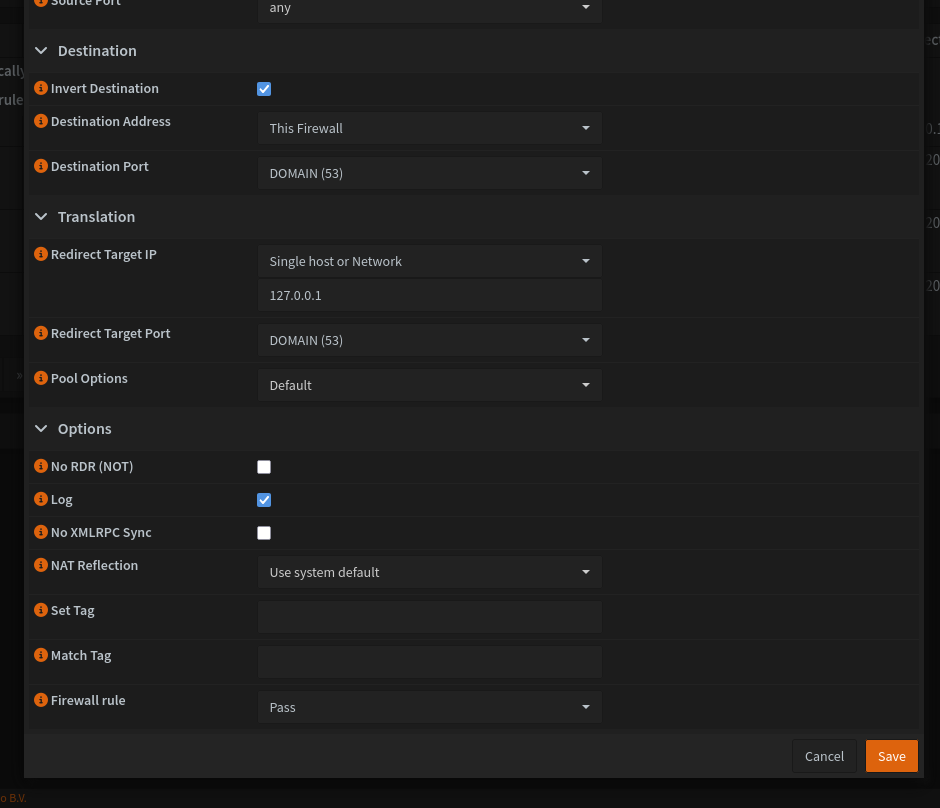
1. Correct Destination NAT Configuration

Interface: Select all your local Interfaces/VLANs (do NOT select WAN or WireGuard).

Protocol: TCP/UDP

Source: any (Leave this completely default, do not invert!).

Port: *

Destination / Invert: Check the [X] (Invert) box.

Destination: Select This Firewall (self).

Port: 53 (domain)

Redirect Target IP: 127.0.0.1

Redirect Target Port: 53 (domain)

Filter Rule Association: Set this to Pass

Your current rule applies to traffic where the Source is not the firewall. We want it to apply to any client whose Destination is not the firewall.


2. Correct Floating Rule Configuration

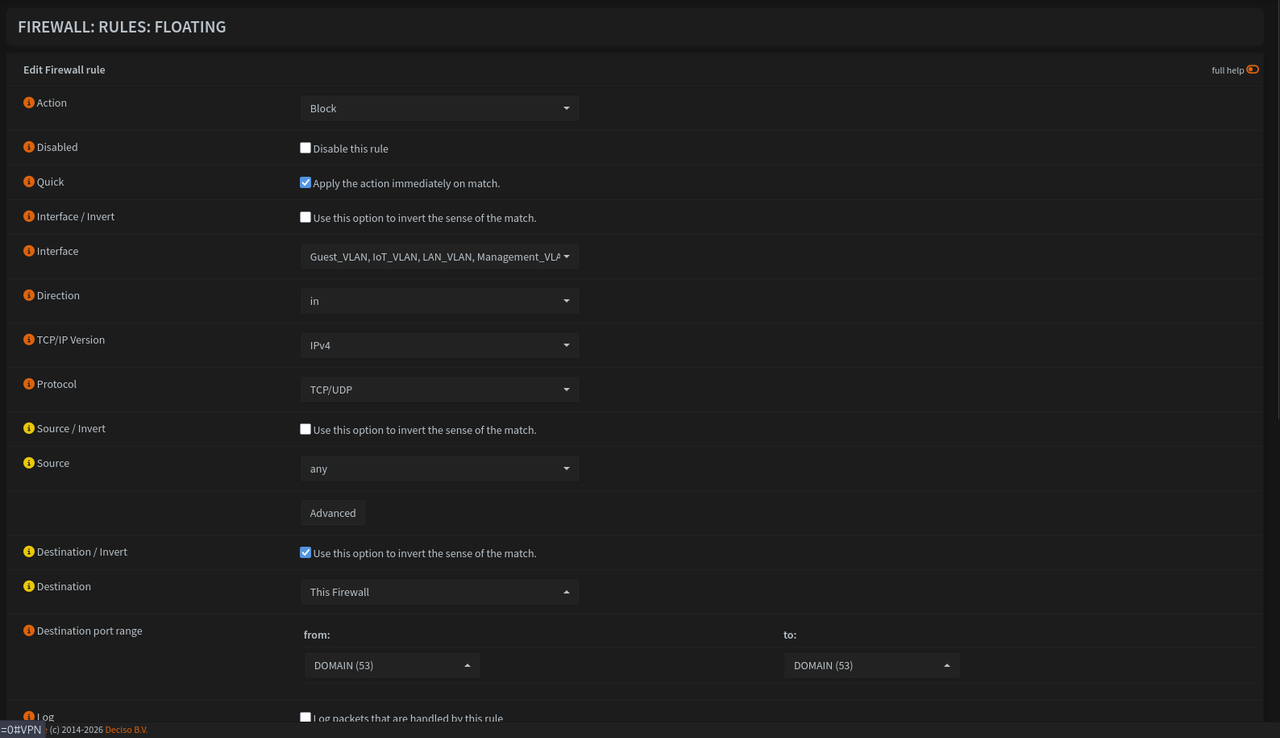
If you still want to use the Floating Rule as a fallback block for port 53, it must only block incoming traffic from clients, never outbound traffic from Unbound.

Action: Block or Reject

Quick: Checked [X] (Apply immediately)

Interface: Select your local Interfaces/VLANs (do NOT select WAN, WireGuard, or Loopback).

Direction: Change this to IN (Currently, it is set to OUT, which blocks Unbound from hitting WAN!).

Protocol: IPv4 TCP/UDP

Source: any (Do not invert!).

Port: *

Destination / Invert: Check the [X] (Invert) box.

Destination: Select This Firewall (self).

Port: 53 (DOMAIN)


By setting Source: ! This Firewall, your rule was trying to match packets where the sender wasn't the firewall. We need to match packets where the intended target (Destination) isn't the firewall.

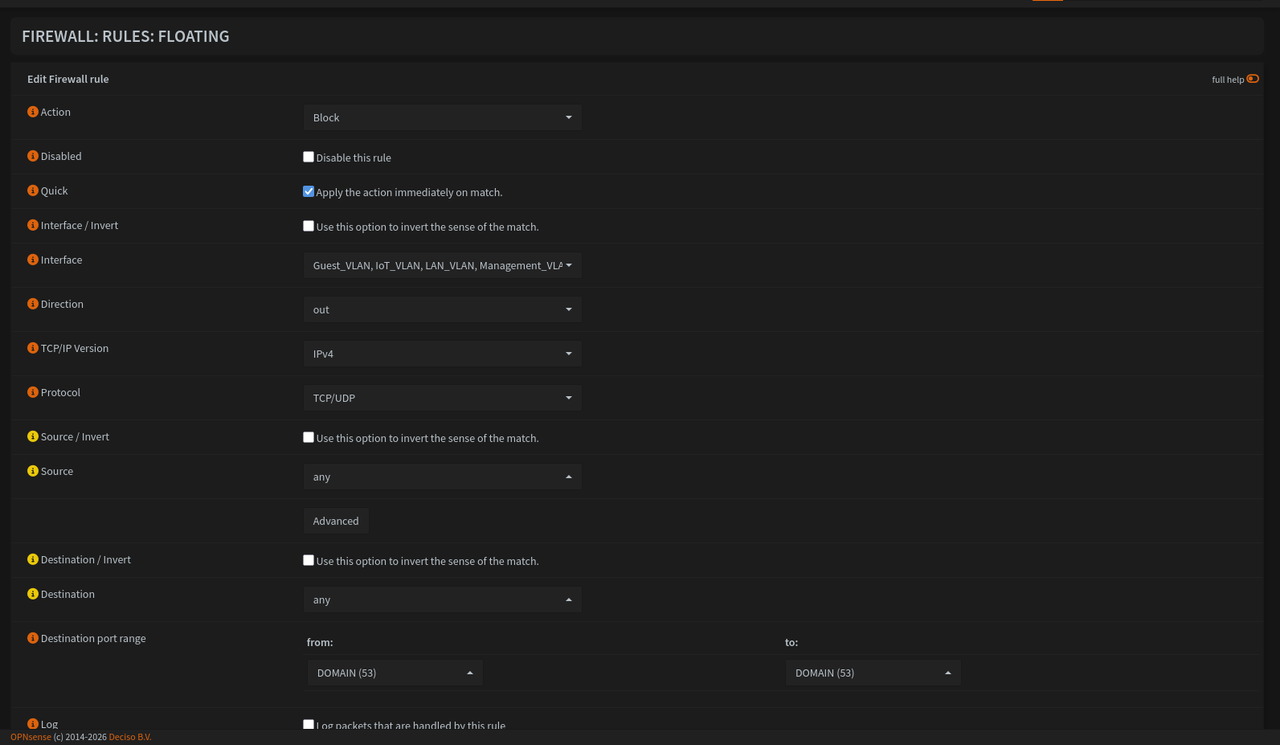
Your Floating Rule had the <- arrow (Outbound). This meant whenever Unbound itself tried to send a DNS request out to the internet via WAN, the firewall blocked it. Changing the direction to IN ensures it only blocks clients trying to push unauthorized DNS traffic into your local interfaces.

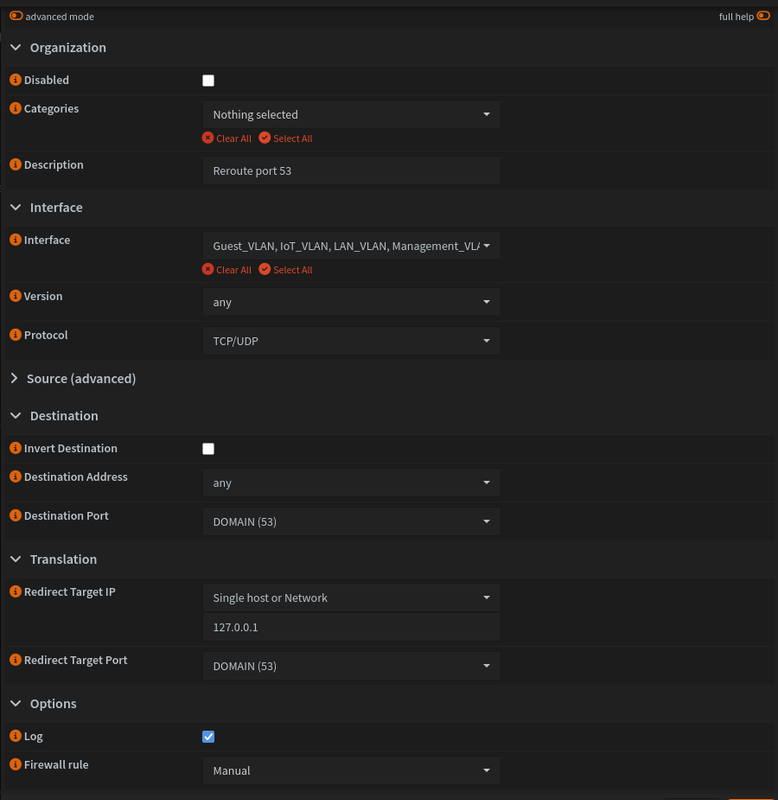
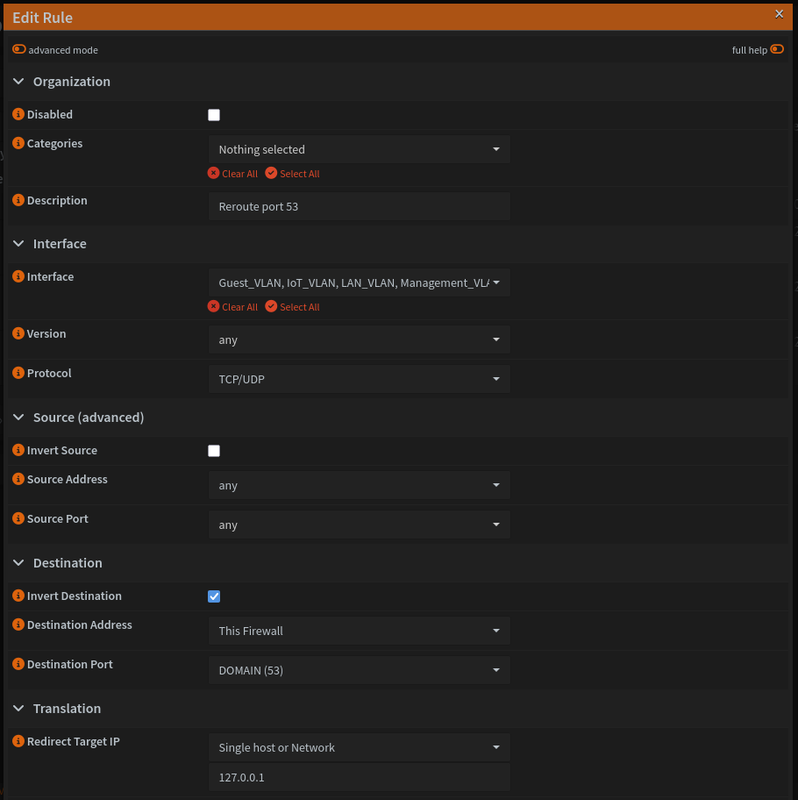
OK here is my destination NAT rule now,

and here is the floating rule,

Are these correct now?  And this will force all clients to use Unbound as their DNS even if they set some custom DNS manually? Like android phones have hardcoded 8.8.8.8 DNS I think..  and the destination NAT rule will forward all the traffic for port 53 that we block via floating to Unbound?
#6
Appreciate all the suggestions and comments. I added a source of "This Firewall" and checked the invert source for both the destination NAT and floating rule, and I still have the issue.
#7
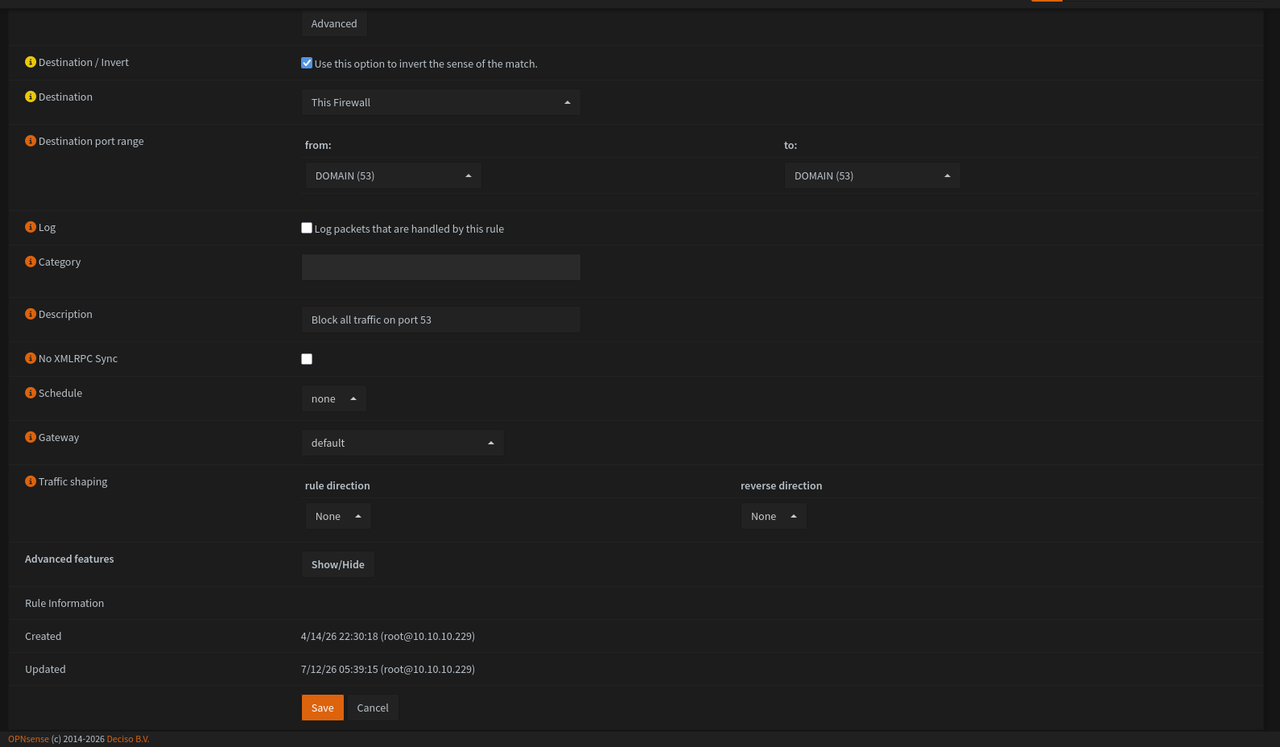
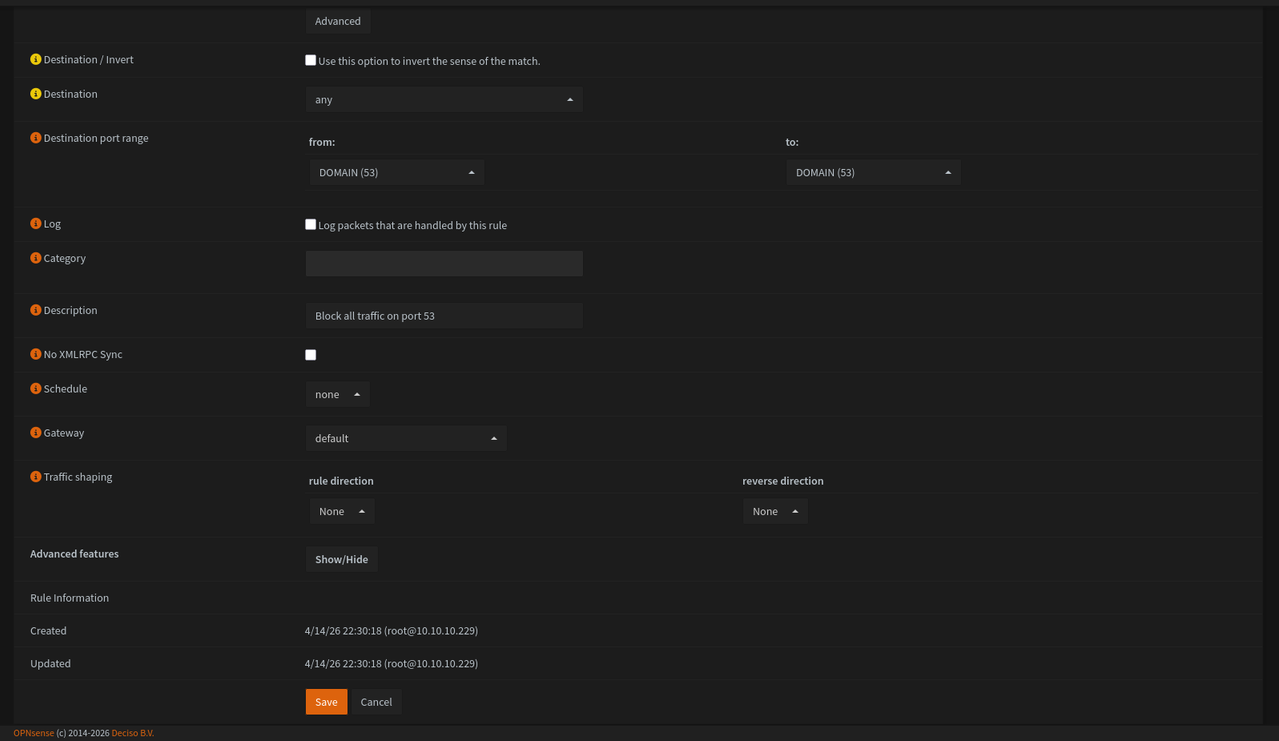
Here is my entire floating rule for blocking port 53 and the destination NAT rule for forwarding port 53 traffic to 127.0.0.1, for all 9 VLANs I have,
Let me know if anything else is needed as well.
#8
Quote from: meyergru on July 09, 2026, 11:02:41 AMBoth could be blocking Unbound Traffic when slightly wrong.

Without both, client might use their own DNS, which is not what I want. I want all devices to my unbound DNS.  Perhaps something I can tweak or filter out in the firewall rule to fix this?
#9
Quote from: meyergru on July 08, 2026, 02:52:38 PMTry disabling the firewall rules for a try. It might be the case that you created a loop where Unbound tries to query itself when it makes upstream queries.


You mean the floating rule that blocks all port 53 traffic for all interfaces? or the destination NAT rule?
#10
I used to use Pi-Hole as my network wide ad-blocker and for local DNS so I can have some like nas.homeserver.lan for all my services I host at home, but I recently learned about Unbound DNS in OPNsense and switched to it, I use DNS over TLS with quad9 for my upstream DNS, I also have various blocklists enabled,
  • Abuse.ch - ThreatFox IOC
  • AdGuard List
  • EasyList
  • EasyPrivacy
  • Steven Black List
  • YoYo List
  • Ads Blocklist
  • NSFW Blocklist
  • Threat Intelligence Feeds
  • Fake - scams / fakes
  • Pop-Up Ads
  • Badware Hoster blocking
and I have various overrides mimicking what I had in Pi-Hole for all my services such as nas.homeserver.lan also added few of my domains for split horizon DNS so the traffic can stay local when I am at home. I also have a floating rule that blocks all port 53 traffic on all my interfaces/VLANs except WAN and and WG interfaces and I also have a destination NAT rule that forwards all port 53 traffic to 127.0.0.1 to force all traffic via Unbound basically.
Now everything works fine, except every few mins, IDK if it crashes or what but DNS resolutions keep failing and I see SERVFAIL error in the Unbound logs and the only solution to this is to restart the Unbound DNS service couple of times and the cycle continues of it crashing and me restarting it fix the issue.
I have attached some photos for my various settings and rules I have regarding this.