

Menu

Show posts

This section allows you to view all posts made by this member. Note that you can only see posts made in areas you currently have access to.

Show posts Menu

Topics - handydutchguy

#1
21.1 Legacy Series / SOLVED - GUI messed up?
February 26, 2021, 05:01:56 AM
Hi all,

New install (VM on Proxmox). HTTPS login screen looks like this. Login is possible, but the page isn't rendering properly on either Edge (regular or private window), or Chrome (regular or private window). Cache cleared.
What am I seeing here?
#2
21.1 Legacy Series / wrong forum... my bad.
February 20, 2021, 04:43:42 AM
wrong forum, sorry.

Mod.. feel free to delete. Don't seem to know how.
#3
General Discussion / OpenVPN client on Linux
September 24, 2018, 05:09:29 AM
Hello all,

I recently set up the openVPN server option following the "Setup SSL VPN Road Warrior" tutorial and it works great using the recommended Viscosity client on a Windows machine.

Connecting from a Linux box however is baffling me. I tried a GUI or the cli option to create a connection. The GUI, as is known, gives very little to no info as to why connection isn't happening. The cli option "openvpn --config [path to .ovpn] file is more descriptive and I'm getting the following output:

$ openvpn --config /home/[user]/VPN.ovpn
Options error: --ca fails with 'OPNsense-udp-1194-ca.crt': No such file or directory (errno=2)
Sun Sep 23 22:01:09 2018 WARNING: cannot stat file 'OPNsense-udp-1194-tls.key': No such file or directory (errno=2)
Options error: --tls-auth fails with 'OPNsense-udp-1194-tls.key': No such file or directory (errno=2)
Options error: Please correct these errors.
Use --help for more information.


Looks to me like the client is asking for a ca cert and tls key? So - what am I missing? Do I need to edit he default client export file? Something else? I can't seem to find the documentation I need to make this work and any help is appreciated.

Thanks in advance for your time.
#4
Hello all,

My question is rooted in frustration with myself. Usually I find that if no one else has the same issue, it's ME that's doing something wrong... Still - I hope someone is willing to be kind enough to help me out.

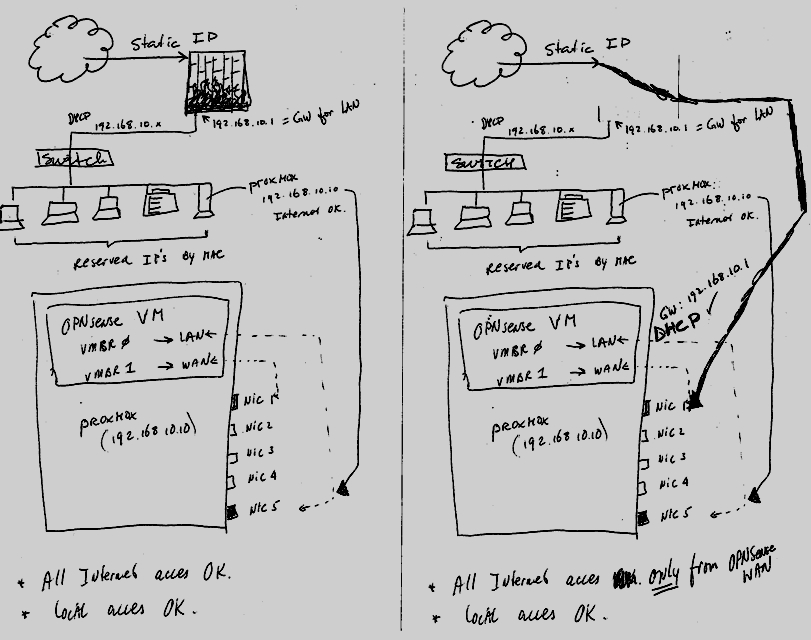
I have had OPNsense on a dedicated box before and had it running just fine. VPN's, different subnets - the usual soho configuration. Now, I've decided to put a new install on a VM in Proxmox. The host box has 2 onboard Intel G-nics and I've put 3 more G-nics in. 2 of those also Intel and one Realtek.

OPNsense has - so far - two vmbr's: vmbr0 (management nic for Proxmox) as the LAN and vmbr1 for WAN.

With OPNsense turned off, my firewall/router is a Sonicwall TZ210 and everything works. If I configure OPNsense with the same IP addressing/gateway/DNS settings and disconnect the Sonicwall and test with OPNsense, I have a problem...

I can ping anything by fqdn or ip address from OPNsense VM, using the WAN as the source, but nothing else works.
Packet capturing shows me that packets from the LAN are leaving OPNsense, but simply trying to open a webpage eventually times out and tells me the website cannot be found.

AAAAARGH...!! I'm sure it's documented elsewhere but I've searched and I've searched, but I couldn't find (... Elvis, anyone?) the answer to the problem.

