
 "
"
Following up onto this thread for anyone still looking for information on this. Managed to get it working today on 26.1.8_5 with an approach I believe is one of the intended ones. Since I haven't found a step-by-step and the issue with Identity association not being selectable seem to have been resolved or can be worked around, might aswell write one. Note that this one's using Dnsmasq for everything but I thought it might feel a little more comprehensive to some folks.
I'll assume your WAN is already set up correctly and you're getting a prefix (tcpdump can get you some insight into that)
After that, setup anything else you need, make sure to check your firewall rules to allow ICMPv6 and whatnot and then...well, things should run. I hope this is atleast somewhat useful to someone (I've been screwed over by logout/editor three times now) and not beyond the scope of this thread.
Note: There's apparently been an update regarding the whole KEA situation four days ago, seems like an option for automatic configuration has been included on master.
Cheers!
I'll assume your WAN is already set up correctly and you're getting a prefix (tcpdump can get you some insight into that)
Code Select
tcpdump -i YOUR_WAN_INTERFACE -n -v ip6 and udp and port 546 or port 547look for something along the lines ofCode Select
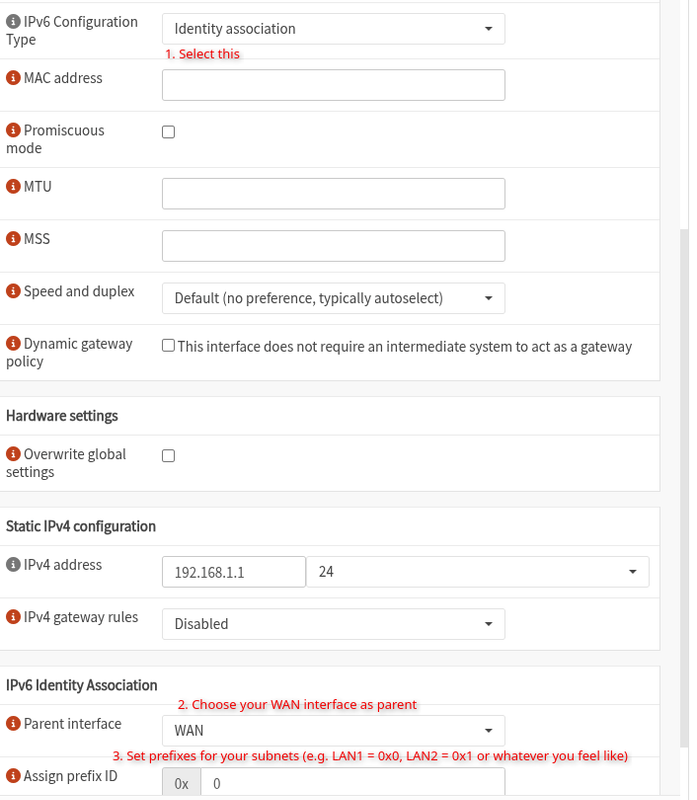
(IA_PD-prefix 2001:xxx:xxx:xxx ... )- LAN interface setup: Rather than using Track Interface, the sister method seems to be Identity association, as has been discussed in this thread. Unfortunately, that will not automatically configure any services but it's not too hard to do that manually with Dnsmasq.
- Services -> Dnsmasq -> General
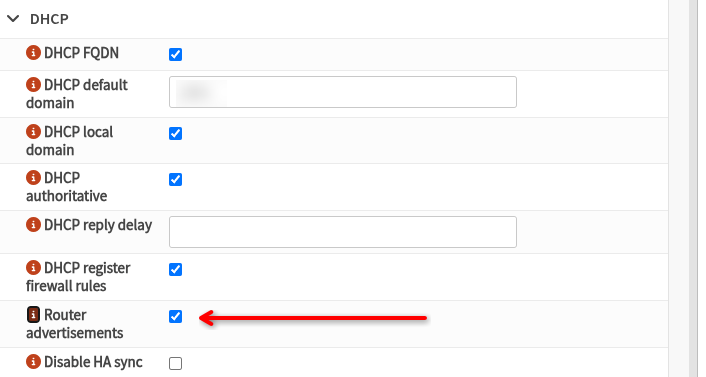
- Services -> Dnsmasq -> DHCP ranges
Now comes the fun part and also the part where you decide how your clients should receive their IPv6 adresses (stateful vs. stateless). If you set your RA mode to slaac, devices will generate a SLAAC address and an additional DHCPv6 address which could be useful for reservations. Using ra-stateless will have your clients only generate a SLAAC address. Now we come to the beauty of constructors which essentially behave like afforementioned tracking- your interface will be used to calculate a RA/DHCPv6 range and you only got to specify your start address as a suffix (e.g. ::1000). So, little + down right for a new DHCP range, switch to Advanced mode and then: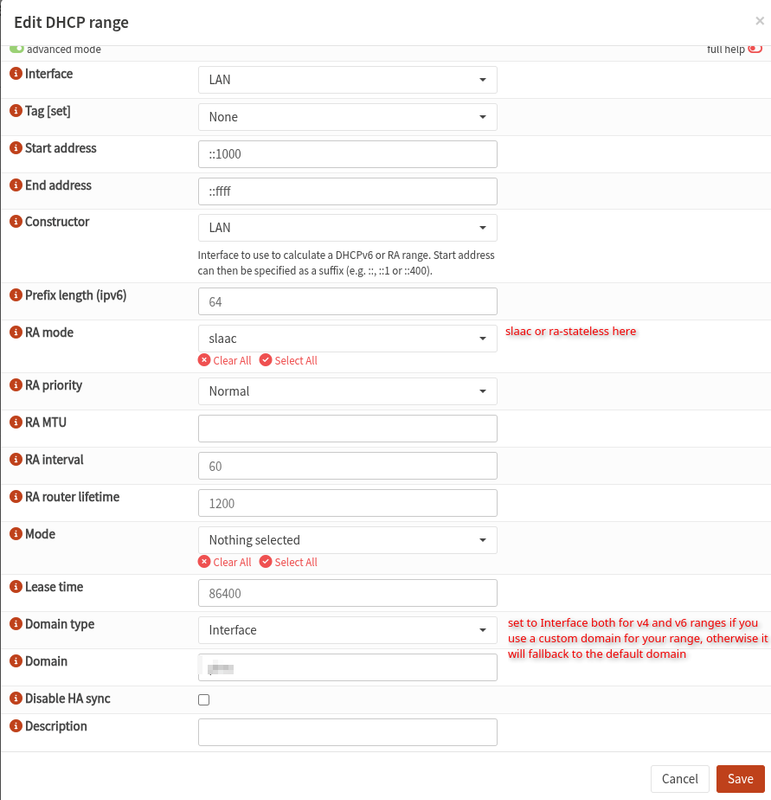
After that, setup anything else you need, make sure to check your firewall rules to allow ICMPv6 and whatnot and then...well, things should run. I hope this is atleast somewhat useful to someone (I've been screwed over by logout/editor three times now) and not beyond the scope of this thread.
Note: There's apparently been an update regarding the whole KEA situation four days ago, seems like an option for automatic configuration has been included on master.
Cheers!

