Menu

Show posts

This section allows you to view all posts made by this member. Note that you can only see posts made in areas you currently have access to.

Show posts Menu

Messages - mercxry

#1
Quote from: SenseX on February 20, 2026, 04:19:15 PMI think you need to add Profile and add your port profiler into it(your vlan).

What do you mean? Where do I add a profile? Can't see an option on OPNSense nor Unifi OS Server 🤔
#2
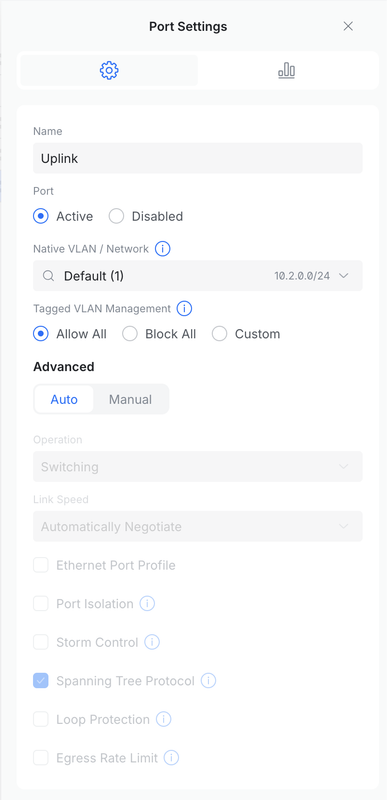
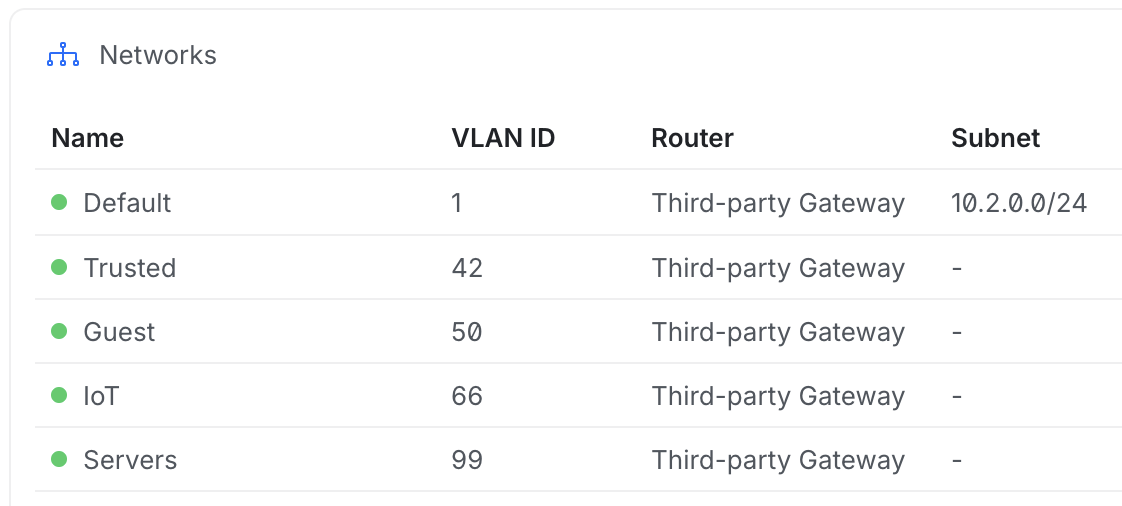
I'm running OPNsense with a UniFi managed switch, the parent interface (igc2) is configured as an untagged LAN network (10.2.0.1/24), and multiple VLANs (42, 50, 66, 99) are configured as subinterfaces on the same physical NIC. Each VLAN has its own subnet (e.g., VLAN 42 = 10.2.42.1/24), DHCP is enabled on all networks, and firewall rules are temporarily wide open for testing. The switch uplink to OPNsense is configured as a trunk with LAN as native and the VLANs tagged.


Inter-VLAN routing works correctly: from a client in VLAN 42 (10.2.42.x), I can ping 10.2.42.1 and also other VLAN gateways like 10.2.50.1. However, I cannot ping nor reach in any way 10.2.0.1 or even any host in the 10.2.0.0/24 network from VLAN 42. From a device physically in 10.2.0.0/24, everything works normally.

When I open the firewall live view and try to ping from 10.2.42.x to 10.2.0.x I don't see anything coming in, so I'm thinking that I've set up something incorrectly on the switch?

Maybe I just shouldn't be mixing LAN and VLANs on the same port, but I'm not sure how to solve that without locking myself out of both OPNSense and Unifi OS Server (I've already tried making LAN a VLAN!), and also I can't assign a VLAN ID to the Default network on Unifi.

Here's my Unifi configuration:


Uplink port:


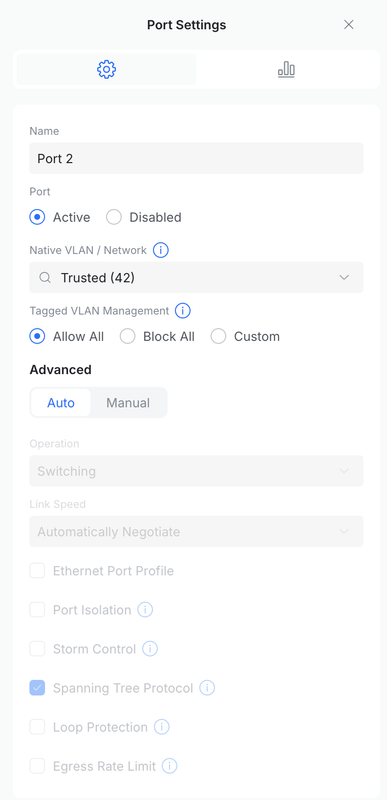
Port for VLAN 42 testing:


Let me know if there is any other info I can provide, I don't know how to solve this one!