Hello,
I have a Fujitsu S920 device with a built-in 1x1GB Ethernet card and an additional PCI Express card with 2x1Gb ports. I installed Proxmox on the Fujitsu S920 to manage all services, and I have set up OPNsense as the main firewall that should handle all traffic from the internet to the LAN.
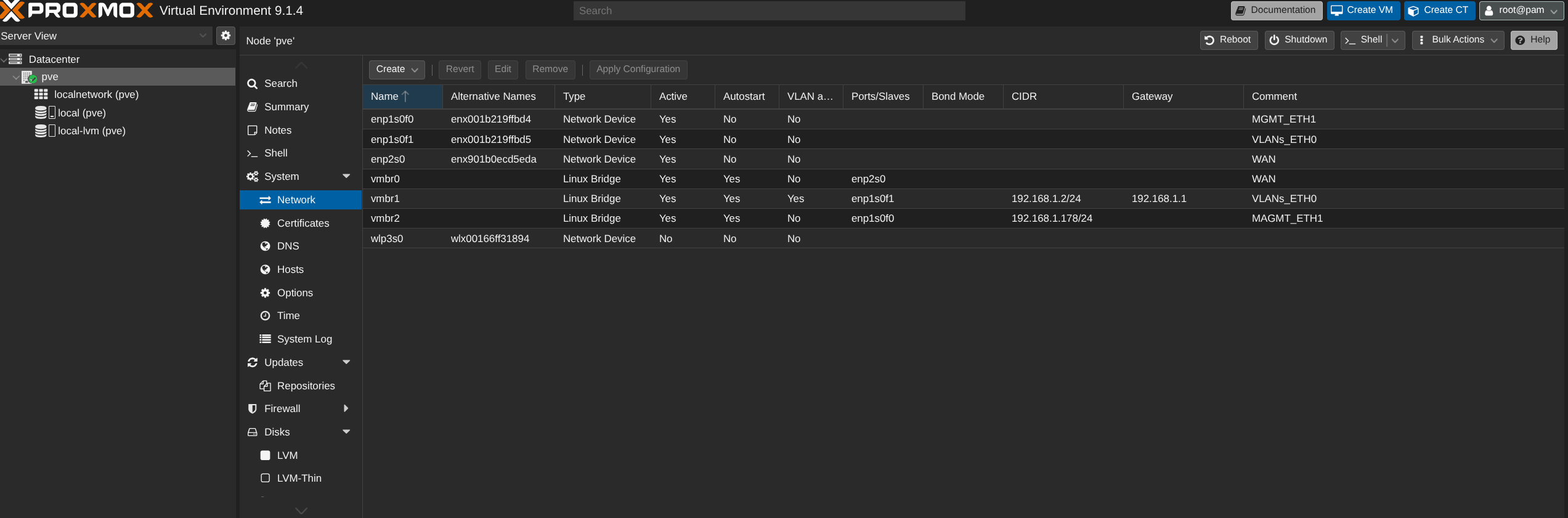
I configured bridges in Proxmox associated with all ports without assigning them IP addresses. The configuration for OPNsense is as follows:
---- ---- ---- ---- ---- ---- ---- ---- ---- ---- ---- ---- ---- ----
IP: 10.0.xxx.90/24
Gateway: 10.0.xxx.1
192.168.1.1/24
---- ---- ---- ---- ---- ---- ---- ---- ---- ---- ---- ---- ---- ----
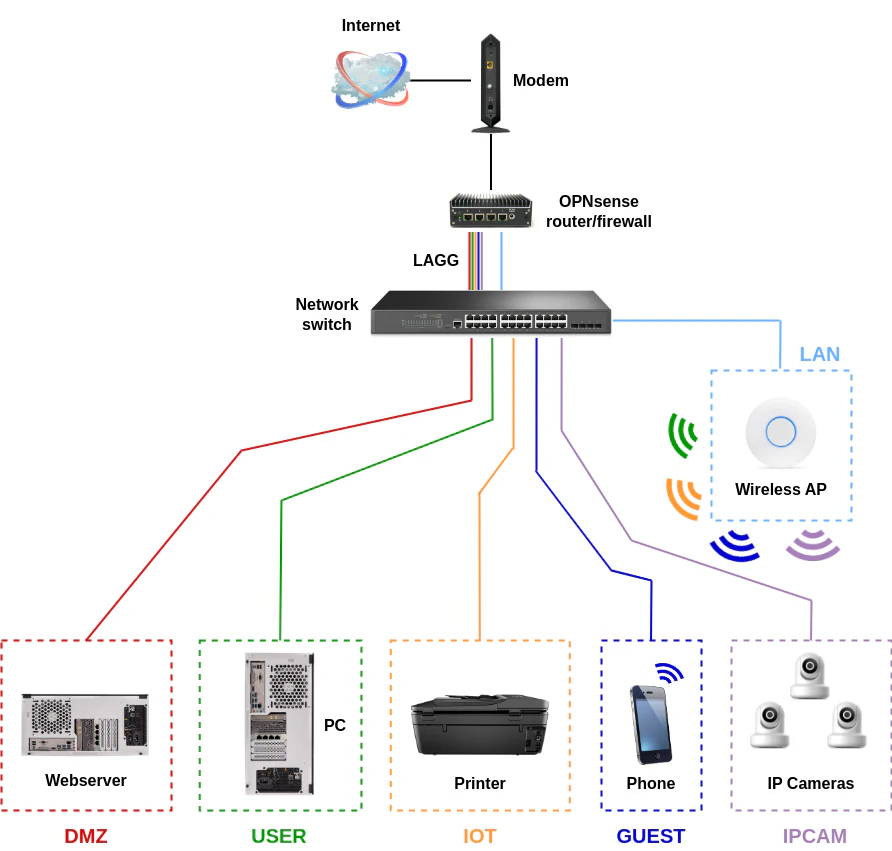
Diagram 1: Proxmox + OPNsense (without LAGG)

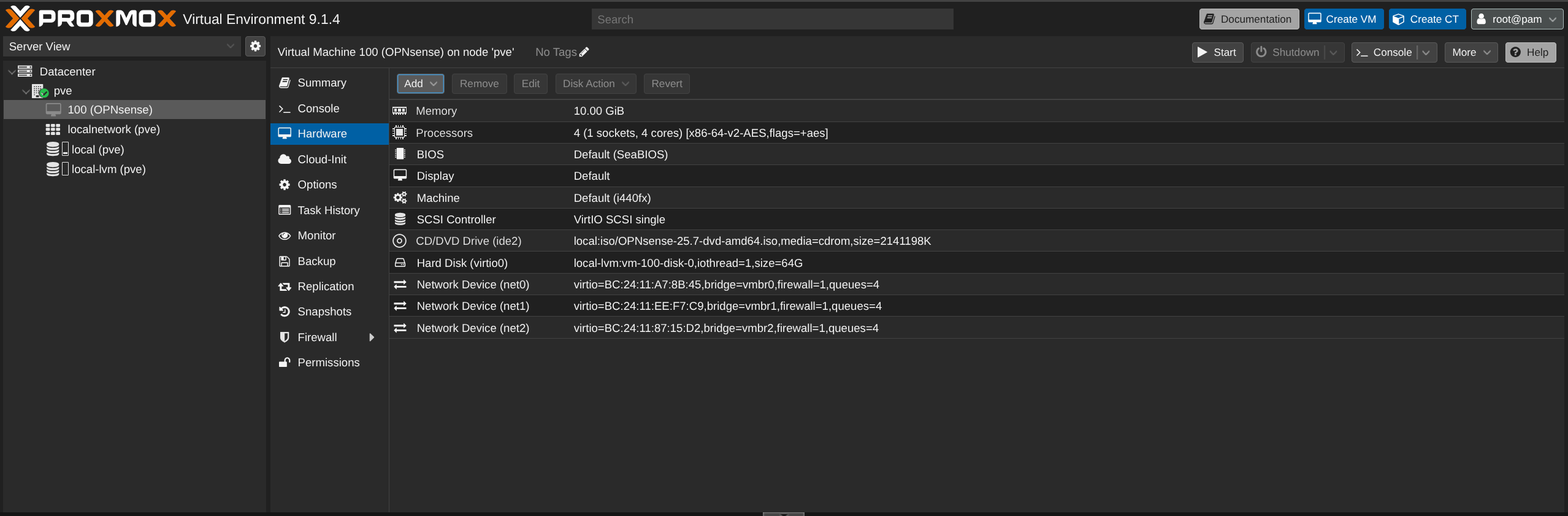
Diagram 2: Proxmox Bridges - OPNsense (in Proxmox)

FIREWALL is not disabled

My problem is that I cannot configure Proxmox and OPNsense correctly to work like my current simple setup:
ISP Modem -> TP Link ER605v2 (OpenWRT) -> TP Link SG108PE Switch -> IoT, PC, WiFi
In this setup, everything works without any issues.
In OPNsense, I diagnosed the problem through ping and was able to access WAN at some point, but only through ping. I checked NAT, firewall rules, and gateways, but I do not know where the problem lies.
I have read many threads on the OPNsense forum, Proxmox forum, and other services, as well as watched instructional videos on configuring, but unfortunately, nothing seems to work.
When connecting without OPNsense and only the MGMT cable with the assigned address of 192.168.1.2/24 in Proxmox, an IP address is assigned by the TP Link SG108PE and the TP Link ER605v2 (OpenWRT). However, when I disconnect the TP Link ER605v2 and replace it with the Fujitsu S920, the configuration does not work. It seems like the TP Link SG108PE switch treats the Fujitsu S920 as a PC and tries to assign it an IP address, while Proxmox with OPNsense does not function as a router or DHCP server.
I apologize in advance if I have frustrated anyone or if this issue has been covered elsewhere, but I genuinely appreciate any help you can provide.
Screenshots from Proxmox
Additionally, I would like the port labeled VLAN to function as a VLAN in the future, but I won't address that yet, even though I considered enabling VLAN on the TP Link SG108PE switch.
I have a Fujitsu S920 device with a built-in 1x1GB Ethernet card and an additional PCI Express card with 2x1Gb ports. I installed Proxmox on the Fujitsu S920 to manage all services, and I have set up OPNsense as the main firewall that should handle all traffic from the internet to the LAN.
I configured bridges in Proxmox associated with all ports without assigning them IP addresses. The configuration for OPNsense is as follows:
- enp0s0 -> vmbr0 as WAN -> vtnet0 (OPNsense)
- enp1s0f1 -> vmbr1 as VLAN (LAN) -> vtnet1 (OPNsense)
- enp0s0f1 -> vmbr2 as MGMT -> vtnet2 (OPNsense)
---- ---- ---- ---- ---- ---- ---- ---- ---- ---- ---- ---- ---- ----
- WAN (vtnet0) in OPNsense received an address from my ISP:
IP: 10.0.xxx.90/24
Gateway: 10.0.xxx.1
- LAN (vtnet1) in OPNsense received DHCP and has the address:
192.168.1.1/24
- MGMT (vtnet2) in OPNsense is currently not receiving any address.
---- ---- ---- ---- ---- ---- ---- ---- ---- ---- ---- ---- ---- ----
Diagram 1: Proxmox + OPNsense (without LAGG)

Diagram 2: Proxmox Bridges - OPNsense (in Proxmox)

FIREWALL is not disabled

My problem is that I cannot configure Proxmox and OPNsense correctly to work like my current simple setup:
ISP Modem -> TP Link ER605v2 (OpenWRT) -> TP Link SG108PE Switch -> IoT, PC, WiFi
In this setup, everything works without any issues.
In OPNsense, I diagnosed the problem through ping and was able to access WAN at some point, but only through ping. I checked NAT, firewall rules, and gateways, but I do not know where the problem lies.
I have read many threads on the OPNsense forum, Proxmox forum, and other services, as well as watched instructional videos on configuring, but unfortunately, nothing seems to work.
When connecting without OPNsense and only the MGMT cable with the assigned address of 192.168.1.2/24 in Proxmox, an IP address is assigned by the TP Link SG108PE and the TP Link ER605v2 (OpenWRT). However, when I disconnect the TP Link ER605v2 and replace it with the Fujitsu S920, the configuration does not work. It seems like the TP Link SG108PE switch treats the Fujitsu S920 as a PC and tries to assign it an IP address, while Proxmox with OPNsense does not function as a router or DHCP server.
I apologize in advance if I have frustrated anyone or if this issue has been covered elsewhere, but I genuinely appreciate any help you can provide.
Screenshots from Proxmox
Additionally, I would like the port labeled VLAN to function as a VLAN in the future, but I won't address that yet, even though I considered enabling VLAN on the TP Link SG108PE switch.
"