Menu

Show posts

This section allows you to view all posts made by this member. Note that you can only see posts made in areas you currently have access to.

Show posts Menu

Messages - jahlives

#16
I may have a stupid question :-) But I assumed that if I enable dhcpv6 server on an interface and the dhcp6 server starts then it should listen on udp ports 547 and 548? I try to setup my box with a Hurrican Elec ipv6 Tunnel. IPv6 works so far on the box but if I want to enable dhcp6 on the LAN interface it seems not to bind to the two ports. According to process list the dhcp6 server is started

dhcpd   62800   0.0  0.2   51904   35680  -  Ss   10:49      0:00.02 /usr/local/sbin/dhcpd -6 -user dhcpd -group dhcpd -chroot /var/dhcpd -cf /etc/dhcpdv6.conf -pf /var/run/dhcpdv6.pid bridge2 bridge3 bridge1 bridge0

but no bindings to the two ports according to netstat command

netstat -f inet6 -n | grep '.547\|.548'


is it right that dhcpv6 server should bind to these two ports or not (or at least 547)? So far only ntp and dns are bound to ipv6

Cheers

tobi

#17
Quote
But igb1 isn't/wasn't your WAN interface?
true but I believe ;) that disable that WAN setting also unset the "default" macro that the LAN rule used under advanced/reply-to. I enabled the WAN reply-to setting again and explicitly set the reply-to in the LAN rule to "disabled". Still works :-)

My guess is that this default setting works fine if opnsense really is the default gateway for the subnet. But as currently my opnsense is not the gateway and uses a default route to reach the outside it sets the default GW address to the IP of the default and uses that in reply-to. So I bet I can change back the LAN rules to reply-to default as soon as my opnsese replaced the pfsense and acts as default gateway

Again thank you a lot
Cheers

tobi
#18
QuoteThis doesn't look right:
stumpled also over it after sending my previous post. That reply-to target is my current router and not the opnsense. So I set "Disable reply-to on WAN rules" and tada the access works. Just wonder why the default (did not change that setting before) sets a "wrong" reply-to address. Also why this WAN setting is applied to LAN rules?

But anyway it works now and I can go on with the config migration from pfsense to opnsense.

Thanks a lot for your help and have a good one

tobi
#19
direction seem to be correct and also quick is set according to pfctl

pass in quick on igb1 reply-to (igb1 192.168.0.1) inet all flags S/SA keep state label "d038f19d181257facbfb9dfd06f5ba32"
pass out quick on igb1 reply-to (igb1 192.168.0.1) inet all flags S/SA keep state label "c38c9c05eb93a192eb2580dde7a38c15"
#20
just out of curiosity I added the allow any/any IPv4 rule to floating. And tada I can still access if pfctl -e
So for whatever reason the rules on LAN are not evaluated/applied. Any idea what could be the reason for ignoring the rules on LAN. LAN interface is definitely the right one: the one that the traffic comes in (igb1). Can I somehow check with pfctl that the rules shown under LAN in GUI are really bound to the right interface? Even if I configure that floating rule explicitly to LAN interface the access still works
#21
Good Morning

Quote
Or, maybe, the pf macro for (self) is not matching your 192.168.0.242 if the anti-lockout rules are present.
.. either way, it seems to be getting caught by the default drop rule.  So something isn't matching an allow rule.

actually I disabled it as I added two rules on LAN as the following (allow IPv4 any/any)

but I still get blocked by the default rule. How comes that such a any/any rule does not match??

One thing I changed in settings is that I enabled filtering on bridges and disabled it on bridge members

net.link.bridge.pfil_bridge 1
net.link.bridge.pfil_member 0

but as said LAN (igb1) is not member of any bridge. Is it possible that these settings disable filtering on ANY interface? Regardless if it's a member of a bridge or not?
#22
Hi

>  Assuming that .242 is NOT the firewall itself?

wrong ;) That is my firewall's ip on LAN interface and the .12 is my client from which I try to access
Thanks for your hint with the pfctl -s that shows me that my assumption was wrong. It seems to be this rule


root@home-opnsense:~ # pfctl -s rules -vv | grep -A 2 ^@8\ block
No ALTQ support in kernel
ALTQ related functions disabled
@8 block drop in log inet all label "02f4bab031b57d1e30553ce08e0ec131"
  [ Evaluations: 160       Packets: 24        Bytes: 1872        States: 0     ]
  [ Inserted: uid 0 pid 55655 State Creations: 0     ]

no idea what this rules does it's not one of mines :-)

My list of interfaces is quite long. As I plan to use this opnsense box as replacment for my pfsense Router at home. So I prepared all the necessary interfaces already (vlan and bridges). But the interface that I use to configure the box atm is the LAN which looks as follows (no vlan or bridge on that)

igb1: flags=8863<UP,BROADCAST,RUNNING,SIMPLEX,MULTICAST> metric 0 mtu 1500
        description: LAN (opt17)
        options=4802028<VLAN_MTU,JUMBO_MTU,WOL_MAGIC,NOMAP>
        ether 20:7c:14:f0:8b:68
        inet 192.168.0.242 netmask 0xffffff00 broadcast 192.168.0.255
        media: Ethernet autoselect (1000baseT <full-duplex>)
        status: active
        nd6 options=29<PERFORMNUD,IFDISABLED,AUTO_LINKLOCAL>

it's about 29 interfaces we're talking about. I can send you the whole ifconfig output if you like but as said currently only LAN interface is in use.
Routing table is quite small

root@home-opnsense:~ # netstat -rn
Routing tables

Internet:
Destination        Gateway            Flags     Netif Expire
default            192.168.0.1        UGS        igb1
10.66.100.0/25     link#28            U       bridge3
10.66.100.1        link#28            UHS         lo0
127.0.0.1          link#10            UH          lo0
172.20.66.0/24     link#26            U       bridge1
172.20.66.1        link#26            UHS         lo0
172.31.254.0/29    link#29            U       bridge0
172.31.254.1       link#29            UHS         lo0
192.168.0.0/24     link#2             U          igb1
192.168.0.242      link#2             UHS         lo0

Internet6:
Destination                       Gateway                       Flags     Netif Expire
::1                               link#10                       UHS         lo0
fe80::%lo0/64                     link#10                       U           lo0
fe80::1%lo0                       link#10                       UHS         lo0


Thanks a lot for you help and let me know if you need further details
Now out for dogwalk

Cheers

tobi
#23
Hello and happy new year

I have a weird issue with opnsense 23.7.11 after upgrading from 23.7.7. Although the issue was already present in my new installation of 23.7.7

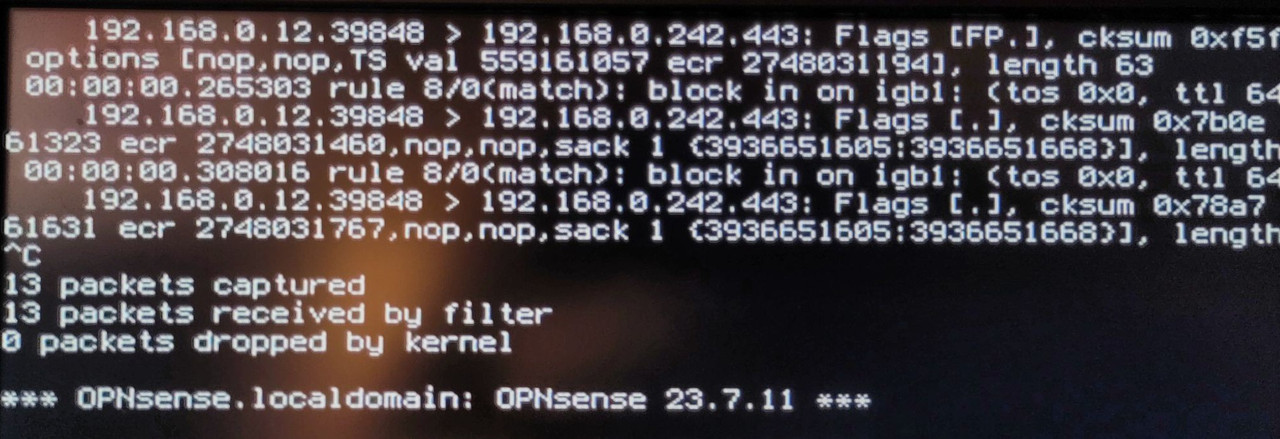
The issue is: that ALL traffic to the firewall is cut off as soon as the rules are active. Only doing pfctl -d get's me access again. I have an allow any on my LAN interface but it seems that the traffic is shutdown earlier by an auto-generated rule. Namely the one that triggers on port 0 access. Checking the firewall log on local console shows me

that rule 8 seems to have hit "rule 8/0(match)" and if I check the autogenerated rules number 8 is the port 0 rule


is there any way how I can disable this particular rule? Did not find an option in GUI. Furthermore the question is this a bug or an issue on my side? Although I could not imagine a widespread bug as then the forum would be full of such issues  ;)

Any hint is highly appreciated
Have a good one

tobi

p.s. seems the embedded screenshots do somehow not work. Need to click on the pic and then after getting to postimg.cc click again to get the pictures in readable :)
#24
changed to WireGuard VPN -> Site2Site works -> me happy :-)
#25
Maybe a picture from server side learned routes does help? (see attachment) Imho it should show there the route for 192.168.770/24 to that particular client
#26
Update:

seems not to be a firewall rules issue. As also cannot ping when pfctl -d
So think firewall issue should be off the table :-)

Found out that I can reach the local subnet on the ovenvpn server side from the local subnet behind the openvpn client. But I cannot reach the local sub behind client from the sub behind server (also the server itself cannot reach it not just clients behind the server). It smells somehow inconsistent but I'm running out of ideas what else to try. Both client and server are opnsenses and are connected via a openvpn site2site Setup
#27
Hello

running latest  OPNsense 22.7_4-amd64 and having an issue with routing via a openvpn connection. I setup openvpn server on opnsense and added the remote network in question (192.168.77.0/24) to server settings in "IPv4 Remote Networks" and to the correct "Client specific overwrite". When the client connects to the server I can see that the route is learned to main routing table.

root@OPNsense:~ # route -n get 192.168.77.130
   route to: 192.168.77.130
destination: 192.168.77.0
       mask: 255.255.255.0
    gateway: 10.230.0.2
        fib: 0
  interface: ovpns2
      flags: <UP,GATEWAY,DONE,STATIC>
recvpipe  sendpipe  ssthresh  rtt,msec    mtu        weight    expire
       0         0         0         0      1500         1         0

10.230.0.2 is the vpn ip of the correct client. I can ping it. But if I try to ping an ip in 192.168.77.0/24 there is no response. If I tcpdump on the client I cannot see one paket coming in on the openvpn connection.
If I check the routing table on server in VPN > connection Status > Routing table I cannot see the route for that network.

From what I know from other openvpn on other opnsense boxes there should be the route to that network displayed. So it seems to me that openvpn does not learn the route internally.

any idea how I could solve this / why the route is not displayed in connection status page?
If more details are needed I'm happily provide it on request :-)

Thanks for any hint

Cheers

tobi